<?xml version="1.0" encoding="utf-8"?><feed xmlns="http://www.w3.org/2005/Atom" ><generator uri="https://jekyllrb.com/" version="4.4.1">Jekyll</generator><link href="https://matan-h.com/feed.xml" rel="self" type="application/atom+xml" /><link href="https://matan-h.com/" rel="alternate" type="text/html" /><updated>2026-03-25T03:40:48-04:00</updated><id>https://matan-h.com/feed.xml</id><title type="html">Matan-h</title><subtitle>my blog</subtitle><author><name>matan-h</name></author><entry><title type="html">Fixed Python autocomplete</title><link href="https://matan-h.com/better-python-autocomplete" rel="alternate" type="text/html" title="Fixed Python autocomplete" /><published>2026-03-23T12:19:57-04:00</published><updated>2026-03-23T12:19:57-04:00</updated><id>https://matan-h.com/fixed-python-autocomplete</id><content type="html" xml:base="https://matan-h.com/better-python-autocomplete"><![CDATA[<p><a href="https://github.com/matan-h/pyhash-complete">repo</a></p>

<h2 id="backstory">Backstory</h2>

<p>This story begins with me opening vscode with a python file and seeing this autocomplete:</p>

<p><img src="../assets/images/os_complete_pylance_lsp.png" alt="screenshot of vscode pylance complete on &quot;os.&quot;" /></p>

<p>I was in the middle of building a simple text editor,and I thought <em>how could vscode,the most popular code editor in the world, be so unoptimized for programmers</em>?</p>

<p>The autocomplete results were filled with functions I used at most once in my life, with some, like <code class="language-plaintext highlighter-rouge">CLD_CONTINUED</code> nowhere to be found, even on the entire public github.</p>

<p>Switching to <a href="https://github.com/astral-sh/ty">ty</a> LSP (fastest,open source LSP) from pylance just highlights the problem (<code class="language-plaintext highlighter-rouge">basedpyright</code> didnt solve it either).</p>

<p><img src="../assets/images/os_complete_ty_lsp.png" alt="screenshot of vscode pylance complete on &quot;os.&quot;" />.</p>

<h2 id="the-problem-with-alphabet-sort-for-code">The problem with alphabet sort for code</h2>

<p>In <a href="https://en.wikipedia.org/wiki/Lexicographic_order">many</a> cases,alphabet order is good. For UI, it looks good.. right?</p>

<ul>
  <li>
    <p><a href="https://m2.material.io/components/lists#usage">Google Material</a> - “Lists should be sorted in logical ways that make content easy to scan, such as alphabetical,..,or by user preference”</p>
  </li>
  <li>
    <p><a href="https://uxcel.com/glossary/sorting">uxcel</a> - “Can be alphabetical, numerical, or custom”</p>
  </li>
  <li>
    <p><a href="https://developer.apple.com/design/human-interface-guidelines/layout#Visual-hierarchy">Apple HIG</a> - “Place items to convey their relative importance”</p>
  </li>
  <li>
    <p><a href="https://www.nngroup.com/articles/alphabetical-sorting-must-mostly-die/">NN/g</a> - “..,prioritization by importance or frequency are usually better than A-Z listings..,People Rarely Think A–Z”</p>
  </li>
</ul>

<p>In programming, you type letter by letter, when you write <code class="language-plaintext highlighter-rouge">sys.a</code> you are (almost) certainly not thinking about <code class="language-plaintext highlighter-rouge">sys.abiflags</code> or <code class="language-plaintext highlighter-rouge">sys.activate_stack_trampoline</code> <offwhite> and if you were thinking about them, you are probably one of the only 10 people in the world who know about them :) </offwhite></p>

<h2 id="solutions">Solutions</h2>

<p>Some IDEs, like PyCharm, offer an AI-based autocomplete, this is usually very good autocomplete. However, it’s slow, and usually off by default. When you type code you don’t want your editor to run a full AI model (or even slower, a full LLM) for every letter you type.</p>

<p>Instead of training an AI to detect the rules of autocomplete so it could work with any module, all I actually needed was a simple table of most used functions/attrs for most common modules, which is going to account for most of the code anyway.</p>

<p>So, I used an existing python dataset, called <a href="https://github.com/saltudelft/many-types-4-py-dataset">ManyTypes4PyDataset</a>,v1.7 which contains 5.2K Python repositories, and I built a simple python script to count all calls to builtin functions or attributes that happened more than once. That results in a table like this one</p>

<table>
  <thead>
    <tr>
      <th>prefix</th>
      <th>score</th>
    </tr>
  </thead>
  <tbody>
    <tr>
      <td>os.stat</td>
      <td>1459</td>
    </tr>
    <tr>
      <td>os.environ</td>
      <td>8317</td>
    </tr>
  </tbody>
</table>

<p>..~100,000 rows</p>

<p>However, just dumping this table would result in a big and slow file for no reason, so I designed a binary to make it faster. The Focus: <em>lookup speed</em>.</p>

<h2 id="hash-score-table-format">Hash Score Table format</h2>

<p>The first thing that takes up space here is the prefix string. Since the format is designed to be query only, no need to include the actual string (instead,it includes just the hash). The format uses a fast hash, FNV-1a , shifted to be 24-bit.</p>

<div class="language-yml highlighter-rouge"><div class="highlight"><pre class="highlight"><code><span class="pi">-</span> <span class="s">Header (magic `HSCT`+version) - 8 bytes</span>
<span class="pi">-</span> <span class="s">capacity and slot count - 8 bytes</span>
<span class="pi">-</span> <span class="na">Slots hash table 4 bytes repeated</span><span class="pi">:</span>
    <span class="pi">-</span> <span class="s">Hash key (FNV-1a &gt;&gt; 8) - 3 bytes</span>
    <span class="pi">-</span> <span class="s">frequency - 1 byte</span>
</code></pre></div></div>
<p>(Using powers of 2 to avoid <code class="language-plaintext highlighter-rouge">%</code> operation on lookup)</p>

<p>The frequency is normalized into 1-255 range, so it can be stored with 1 byte.</p>

<p>By this point, I abandoned my python script, and migrated it to go (partly using an LLM, they are trained on go), as python was good as a prototype, but it was too slow to iterate every time on the 5k json files.</p>

<h2 id="thresholds">Thresholds</h2>

<p>Following the steps above gives a ~<code class="language-plaintext highlighter-rouge">4.4Mb file</code>, mostly full of things like <code class="language-plaintext highlighter-rouge">myClass.A()</code>,that are too specific. creating a classical name filter (<code class="language-plaintext highlighter-rouge">A.A</code>) only changes the file size to a ~<code class="language-plaintext highlighter-rouge">4.2Mb file</code>.</p>

<p>I added two new thresholds.</p>

<ol>
  <li>Filter by total number of calls (or accesses). For example, if <code class="language-plaintext highlighter-rouge">os.stat</code> was called 1459 times, it’s probably because it’s popular (raw)</li>
  <li>Filter by number of projects calling. For example, if a function is called 1500 times only by a single project, it is probably <strong>not</strong> popular (proj)</li>
</ol>

<p>These two thresholds very quickly changed the file size, as you can see in the interactive. Important calls/attr dropped appear below.</p>

<h2 id="update">UPDATE:</h2>
<p>Using path filtering and a bit of over elimination (only considering unique paths), I got the project threshold to work better, and so reduce the size of p=3 r=2 by 3/4</p>

<section id="threshold-explorer">
<style>
#threshold-explorer {
  background: #111;
  padding: 16px;
}
#threshold-explorer input[type=range] { accent-color: #2dd027; }
#result-size { font-size: 1.6em; font-weight: bold; color: white; margin: 14px 0 2px; }
#result-keys { color: #666; }
#dropped-symbols {
  font-size: 11px;
  color: #666;
  border-top: 1px solid #222;
  padding-top: 10px;
  line-height: 1.8;
}
#dropped-symbols b { color: #e8c07d; }
#dropped-symbols span { color: #555; }
</style>

<form id="threshold-form">
  <label for="raw-range">raw ≥ <output for="raw-range" id="raw-output">1</output></label>
  <input type="range" id="raw-range" min="0" max="14" value="0" />

<label for="proj-range">proj ≥ <output for="proj-range" id="proj-output">1</output></label>
<input type="range" id="proj-range" min="0" max="11" value="2" />

</form>

<p id="result-size">—</p>
<p id="result-keys"></p>
<p id="dropped-symbols"></p>

<script>
  let distmap = null;
  let byId = document.getElementById.bind(document)
  let byIdv =(v)=>document.getElementById(v).value

  
  const RAW_THRESHOLDS  = [2,3,5,7,10,20,50,100,200,500,1000,2000,5000,10000,50000];
  const PROJ_THRESHOLDS = [1,2,3,5,7,10,20,50,100,200,500,1000];

  function formatBytes(bytes) {
    if (bytes >= 1048576) return (bytes / 1048576).toFixed(2) + ' MB';
    if (bytes >= 1024)    return Math.round(bytes / 1024) + ' KB';
    return bytes + ' B';
  }

  function render() {
    if (!distmap) return;

    const rawIndex  = Number(byIdv('raw-range'));
    const projIndex = Number(byIdv('proj-range'));

    byId('raw-output').value  = RAW_THRESHOLDS[rawIndex];
    byId('proj-output').value = PROJ_THRESHOLDS[projIndex];

    const cell = distmap.grid[rawIndex][projIndex];
    byId('result-size').textContent = "~"+formatBytes(cell.bytes);
    byId('result-keys').textContent = cell.count.toLocaleString() + ' keys';

    const dropped = [];
    for (const band of distmap.projLosses) {
      if (PROJ_THRESHOLDS[projIndex] > band.to)
        for (const ex of band.examples) dropped.push(ex);
    }
    for (const band of distmap.rawLosses) {
      if (RAW_THRESHOLDS[rawIndex] > band.to)
        for (const ex of band.examples) dropped.push(ex);
    }

  const droppedEl = byId('dropped-symbols');
droppedEl.textContent = '';

if (dropped.length) {
  droppedEl.append('top dropped: ');
  dropped.forEach((e, i) => {
    const b = document.createElement('b');
    b.textContent = e.key;
    const s = document.createElement('span');
    s.textContent = ` r=${e.r} p=${e.p}`;
    droppedEl.append(b, s);
    if (i < dropped.length - 1) droppedEl.append(' · ');
  });
}
  }

  byId('threshold-form').addEventListener('change', render);

  fetch('../assets/json/pyhash-distmap.json')
    .then(r => r.json())
    .then(data => {
      const lookup = Object.fromEntries(data.grid.map(c => [`${c.rt}_${c.pt}`, c]));
      distmap = {
        grid: RAW_THRESHOLDS.map(rt => PROJ_THRESHOLDS.map(pt => lookup[`${rt}_${pt}`])),
        rawLosses:  data.rawLosses,
        projLosses: data.projLosses,
      };
      render();
    });
</script>
</section>

<h2 id="result">Result</h2>

<figure class="half ">
  
    
      <img src="/assets/images/os_complete_ty_lsp_sorted.webp" alt="" />


      <img src="/assets/images/sys_complete_ty_lsp_sorted.webp" alt="" />


    <figcaption>On the left, <code class="language-plaintext highlighter-rouge">os.</code> autocomplete. On the right, <code class="language-plaintext highlighter-rouge">sys.</code> autocomplete
</figcaption>
  
</figure>

<p>There are many ways to use this table, you can look at the pyhash <a href="https://github.com/matan-h/pyhash-complete">repo</a>. I published prebuilt datasets in releases.</p>

<p>My ty <a href="https://github.com/matan-h/ruff-fork/tree/pyhash2">fork</a> includes a table (raw threshold 7), hopefully it will be <a href="https://github.com/astral-sh/ruff/pull/24050">merged</a> to ty sometime. In the meantime, <a href="https://github.com/matan-h/pyhash-complete/blob/main/BUILD-TY.md">you can build it and use it manually</a></p>

<hr />

<p>This was one of the most interesting projects I’ve done. Looking at vscode from the viewpoint of a new editor developer presented the opportunity to do this.</p>

<p>“In all affairs, it’s a healthy thing now and then to hang a question mark on the things you have long taken for granted” ~ Russell</p>]]></content><author><name>matan-h</name></author><category term="dev-tools" /><category term="development" /><category term="python" /><category term="utility" /><category term="editor" /><summary type="html"><![CDATA[I fixed autocomplete sorting]]></summary><media:thumbnail xmlns:media="http://search.yahoo.com/mrss/" url="https://matan-h.com/assets/images/os_complete_ty_lsp_sorted.webp" /><media:content medium="image" url="https://matan-h.com/assets/images/os_complete_ty_lsp_sorted.webp" xmlns:media="http://search.yahoo.com/mrss/" /></entry><entry><title type="html">Intel Suspicious XSS</title><link href="https://matan-h.com/intel-suspicious-xss" rel="alternate" type="text/html" title="Intel Suspicious XSS" /><published>2025-03-16T13:28:32-04:00</published><updated>2025-03-16T13:28:32-04:00</updated><id>https://matan-h.com/intel-suspicious-xss</id><content type="html" xml:base="https://matan-h.com/intel-suspicious-xss"><![CDATA[<p><img src="../assets/images/intel-xss.webp" alt="screenshot of intel.com alert" /></p>
<h2 id="minimal-research">minimal research</h2>
<p>Just the other day, I was browsing the homepages of big companies (with the purpose of finding interesting things) and was shocked by the <a href="https://www.intel.com/content/www/us/en/homepage.html">Intel.com</a> website.</p>

<p>The first thing that got me interested, is that from a simple search of <code class="language-plaintext highlighter-rouge">debug</code> in the developer tools I get a result like <code class="language-plaintext highlighter-rouge">location.search.includes("debugger")</code> (check if the URL part after <code class="language-plaintext highlighter-rouge">?</code> include <code class="language-plaintext highlighter-rouge">debugger</code>). That is weird, but not uncommon for a company to have. I append <code class="language-plaintext highlighter-rouge">?debugger=true</code> and noticed the page didn’t change much.</p>

<p>But after comparing to the search result for <code class="language-plaintext highlighter-rouge">location.href=</code> I discovered the page did change (in fact, it would have on any URL parameter), because now there are more JavaScript scripts loaded: most notably, there is now a new file <code class="language-plaintext highlighter-rouge">commons-page.min.js</code> which includes most of the results (which is already a red alert, as setting <code class="language-plaintext highlighter-rouge">location.href</code> to non-fixed addresses is not recommended). The new file is non-debuggable and generated dynamically through a jQuery script so it’s not possible to debug in chromium and showed up as <code class="language-plaintext highlighter-rouge">sourceNNN</code> in Firefox.</p>

<h2 id="challenge">Challenge</h2>
<p>The new script uses the function <code class="language-plaintext highlighter-rouge">CQ.shared.XSS.getXSSValue</code> to protect against XSS.
Here is the function definition:</p>
<div class="language-javascript highlighter-rouge"><div class="highlight"><pre class="highlight"><code><span class="nx">shared</span><span class="p">.</span><span class="nx">XSS</span><span class="p">.</span><span class="nx">getXSSValue</span><span class="p">:</span> <span class="nf">function </span><span class="p">(</span><span class="nx">a</span><span class="p">)</span> <span class="p">{</span> 
    <span class="k">return</span>  <span class="nx">_g</span><span class="p">.</span><span class="nx">Util</span><span class="p">.</span><span class="nf">htmlEncode</span><span class="p">(</span><span class="nx">a</span><span class="p">)</span>
<span class="p">}</span>
<span class="nx">Util</span><span class="p">.</span><span class="nx">htmlEncode</span><span class="p">:</span> <span class="nf">function </span><span class="p">(</span><span class="nx">a</span><span class="p">)</span> <span class="p">{</span>
    <span class="k">return</span> <span class="nc">String</span><span class="p">(</span><span class="nx">a</span><span class="p">)</span>
        <span class="p">.</span><span class="nf">replace</span><span class="p">(</span><span class="sr">/&amp;/g</span><span class="p">,</span> <span class="dl">'</span><span class="s1">&amp;amp;</span><span class="dl">'</span><span class="p">)</span>
        <span class="p">.</span><span class="nf">replace</span><span class="p">(</span><span class="sr">/&gt;/g</span><span class="p">,</span> <span class="dl">'</span><span class="s1">&amp;gt;</span><span class="dl">'</span><span class="p">)</span>
        <span class="p">.</span><span class="nf">replace</span><span class="p">(</span><span class="sr">/&lt;/g</span><span class="p">,</span> <span class="dl">'</span><span class="s1">&amp;lt;</span><span class="dl">'</span><span class="p">)</span>
        <span class="p">.</span><span class="nf">replace</span><span class="p">(</span><span class="sr">/"/g</span><span class="p">,</span> <span class="dl">'</span><span class="s1">&amp;quot;</span><span class="dl">'</span><span class="p">)</span> 
<span class="p">}</span>
</code></pre></div></div>
<p>The function escapes HTML tags (like <code class="language-plaintext highlighter-rouge">&lt;</code> and <code class="language-plaintext highlighter-rouge">&gt;</code> along with escaping double quotes).</p>

<p>As of writing this article, the XSS is live at intel.com. You can go right now to experiment and find the XSS on your own. The XSS part seems unrelated to the structure of the file, as if someone added it in a hurry.</p>

<p>Since I found this XSS the WAF (Akami edgesuite) became a little more sophisticated, and now blocks all obvious attempts to run XSS. As of today, when you want to test your XSS, make the target be <code class="language-plaintext highlighter-rouge">javascript:decodeURIComponent(location.hash)</code>, and experiment with the hash instead of the URL parameters.</p>

<p>Go now to <a href="https://www.intel.com/content/www/us/en/homepage.html?debugger=true">https://www.intel.com/content/www/us/en/homepage.html?debugger=true</a> take 5 minutes, and try to find the XSS yourself!</p>

<p>Note to Brave browser users: Brave shields block the dynamic file as “fingerprinting” so disable that.</p>
<hint>Hint: it's at the end of the new dynamic file `commons-min.js`</hint>
<details>
  <summary> <b>Solution</b> </summary>
  <p>At end of the dynamic file this part appears:</p>

  <div class="language-javascript highlighter-rouge"><div class="highlight"><pre class="highlight"><code><span class="kd">var</span> <span class="nx">queryParamsURL</span> <span class="o">=</span> <span class="nx">CQ</span><span class="p">.</span><span class="nx">shared</span><span class="p">.</span><span class="nx">XSS</span><span class="p">.</span><span class="nf">getXSSValue</span><span class="p">(</span><span class="nb">window</span><span class="p">.</span><span class="nx">location</span><span class="p">.</span><span class="nx">search</span><span class="p">)</span>
  <span class="p">,</span> <span class="nx">queryParams</span> <span class="o">=</span> <span class="nx">queryParamsURL</span><span class="p">.</span><span class="nf">slice</span><span class="p">(</span><span class="mi">1</span><span class="p">);</span>

<span class="k">if </span><span class="p">(</span><span class="nx">queryParams</span> <span class="o">&amp;&amp;</span> <span class="nx">queryParams</span><span class="p">.</span><span class="nf">includes</span><span class="p">(</span><span class="dl">"</span><span class="s2">doRedirect</span><span class="dl">"</span><span class="p">)</span> <span class="o">&amp;&amp;</span> <span class="nx">queryParams</span><span class="p">.</span><span class="nf">includes</span><span class="p">(</span><span class="dl">"</span><span class="s2">timeDelay</span><span class="dl">"</span><span class="p">))</span> <span class="p">{</span>
    <span class="k">for </span><span class="p">(</span><span class="kd">var</span> <span class="nx">url</span><span class="p">,</span> <span class="nx">timeDelay</span><span class="p">,</span> <span class="nx">params</span> <span class="o">=</span> <span class="nx">queryParams</span><span class="p">.</span><span class="nf">split</span><span class="p">(</span><span class="dl">"</span><span class="se">\</span><span class="s2">x26</span><span class="dl">"</span><span class="p">),</span> <span class="nx">i$22</span> <span class="o">=</span> <span class="mi">0</span><span class="p">;</span> <span class="nx">i$22</span> <span class="o">&lt;</span> <span class="nx">params</span><span class="p">.</span><span class="nx">length</span><span class="p">;</span> <span class="nx">i$22</span><span class="o">++</span><span class="p">)</span> <span class="c1">// "\x26" = "&amp;"</span>
        <span class="nx">params</span><span class="p">[</span><span class="nx">i$22</span><span class="p">].</span><span class="nf">includes</span><span class="p">(</span><span class="dl">"</span><span class="s2">doRedirect</span><span class="dl">"</span><span class="p">)</span> <span class="o">&amp;&amp;</span> <span class="p">(</span><span class="nx">url</span> <span class="o">=</span> <span class="nx">params</span><span class="p">[</span><span class="nx">i$22</span><span class="p">].</span><span class="nf">split</span><span class="p">(</span><span class="dl">"</span><span class="s2">doRedirect</span><span class="se">\</span><span class="s2">x3d</span><span class="dl">"</span><span class="p">)[</span><span class="mi">1</span><span class="p">]),</span> <span class="c1">// "\x3d" = "="</span>
        <span class="nx">params</span><span class="p">[</span><span class="nx">i$22</span><span class="p">].</span><span class="nf">includes</span><span class="p">(</span><span class="dl">"</span><span class="s2">timeDelay</span><span class="dl">"</span><span class="p">)</span> <span class="o">&amp;&amp;</span> <span class="p">(</span><span class="nx">timeDelay</span> <span class="o">=</span> <span class="nx">params</span><span class="p">[</span><span class="nx">i$22</span><span class="p">].</span><span class="nf">split</span><span class="p">(</span><span class="dl">"</span><span class="s2">timeDelay</span><span class="se">\</span><span class="s2">x3d</span><span class="dl">"</span><span class="p">)[</span><span class="mi">1</span><span class="p">]);</span>

    <span class="nx">url</span> <span class="o">&amp;&amp;</span> <span class="nx">timeDelay</span> <span class="o">&amp;&amp;</span> <span class="nf">setTimeout</span><span class="p">(</span><span class="kd">function</span><span class="p">()</span> <span class="p">{</span>
        <span class="nb">window</span><span class="p">.</span><span class="nx">location</span><span class="p">.</span><span class="nx">href</span> <span class="o">=</span> <span class="nx">url</span>
    <span class="p">},</span> <span class="nx">timeDelay</span><span class="p">)</span>
<span class="p">};</span>
</code></pre></div>  </div>
  <p>which, deobfuscated to pseudocode is:</p>
  <div class="language-javascript highlighter-rouge"><div class="highlight"><pre class="highlight"><code><span class="kd">const</span> <span class="nx">queryParamsURL</span> <span class="o">=</span> <span class="nx">CQ</span><span class="p">.</span><span class="nx">shared</span><span class="p">.</span><span class="nx">XSS</span><span class="p">.</span><span class="nf">getXSSValue</span><span class="p">(</span><span class="nb">window</span><span class="p">.</span><span class="nx">location</span><span class="p">.</span><span class="nx">search</span><span class="p">)</span>
<span class="kd">const</span> <span class="nx">url</span> <span class="o">=</span> <span class="nx">queryParamsURL</span><span class="p">.</span><span class="nf">get</span><span class="p">(</span><span class="dl">"</span><span class="s2">doRedirect</span><span class="dl">"</span><span class="p">)</span>
<span class="kd">const</span> <span class="nx">timeDelay</span> <span class="o">=</span> <span class="nx">queryParamsURL</span><span class="p">.</span><span class="nf">get</span><span class="p">(</span><span class="dl">"</span><span class="s2">timeDelay</span><span class="dl">"</span><span class="p">)</span>

<span class="k">if </span><span class="p">(</span><span class="nx">url</span> <span class="o">&amp;&amp;</span> <span class="nx">timeDelay</span><span class="p">){</span>
     <span class="c1">// run `window.location.href = url` after timeDelay ms.</span>
    <span class="nf">setTimeout</span><span class="p">(()</span><span class="o">=&gt;</span><span class="p">{</span>
        <span class="nb">window</span><span class="p">.</span><span class="nx">location</span><span class="p">.</span><span class="nx">href</span> <span class="o">=</span> <span class="nx">url</span>
    <span class="p">},</span> <span class="nx">timeDelay</span><span class="p">)</span>
<span class="p">}</span>
</code></pre></div>  </div>
  <p>The <code class="language-plaintext highlighter-rouge">CQ.shared.XSS.getXSSValue</code> is not relevant, as it protects against HTML injection, and not against XSS using redirect to the <code class="language-plaintext highlighter-rouge">javascript:</code> protocol.</p>

  <p>That means that a URL like <code class="language-plaintext highlighter-rouge">?doRedirect=javascript:alert(6)&amp;timeDelay=0</code> should successfully run JavaScript, however the WAF blocks that because of the <code class="language-plaintext highlighter-rouge">alert(</code> keyword, so I bypassed it using location.hash: <code class="language-plaintext highlighter-rouge">?timeDelay=4&amp;doRedirect=javascript:decodeURIComponent(location.hash)#&lt;svg%20onload=alert(document.domain)&gt;&lt;/svg&gt;</code> and I got XSS.</p>
</details>

<h2 id="intel">intel</h2>

<p>Intel doesn’t provide a bug bounty for website vulnerabilities as they don’t consider that a product.
So I opened up an <em>informative</em> bug report, here is the response:
<img src="../assets/images/intel_of_of_scope.webp" title="bug report asking me to send email" alt="intel_of_of_scope.webp" data-align="center" />
However, they didn’t respond to any of the emails I sent to <code class="language-plaintext highlighter-rouge">external.security.research@intel.com</code>.</p>

<p>I wonder if one of the employees added it (when they were fired, for example), as the XSS doesn’t fit at all in the tracking file, and it was obfuscated strangely.</p>

<p>I hope you enjoy testing out intel’s new XSS :)</p>]]></content><author><name>matan-h</name></author><category term="cyber" /><category term="cyber" /><category term="hidden" /><category term="intel" /><summary type="html"><![CDATA[an XSS in Intel.com]]></summary><media:thumbnail xmlns:media="http://search.yahoo.com/mrss/" url="https://matan-h.com/assets/images/intel-xss.webp" /><media:content medium="image" url="https://matan-h.com/assets/images/intel-xss.webp" xmlns:media="http://search.yahoo.com/mrss/" /></entry><entry><title type="html">History Game</title><link href="https://matan-h.com/cyber/history-game/" rel="alternate" type="text/html" title="History Game" /><published>2024-11-24T07:15:43-05:00</published><updated>2024-11-24T07:15:43-05:00</updated><id>https://matan-h.com/cyber/history-game</id><content type="html" xml:base="https://matan-h.com/cyber/history-game/"><![CDATA[<p>While I was reading information about CSS-only games, I stumbled across a CSS Pseudo-class [like <code class="language-plaintext highlighter-rouge">:hover</code>] called <a href="https://developer.mozilla.org/en-US/docs/Web/CSS/:visited"><code class="language-plaintext highlighter-rouge">:visited</code></a> that can be used to style links that the user already visited [for example, purple if they have been visited and blue if they haven’t been visited yet.].
I went on created a game that uses <code class="language-plaintext highlighter-rouge">:visited</code> to detect in which popular websites you have been.
You can <a href="/falling-history">try it now</a>. <em>[not for phones.]</em></p>

<p><img src="/assets/images/history-game-gif.gif" alt="video screenshot of the history game where user click on falling characters" class="centered" /></p>

<h2 id="visited-security">:visited security</h2>
<p>My first instinct was to try and see if a site can detect if this is applied. I was far from the first one to try this, and the browser already puts quite a few <a href="https://developer.mozilla.org/en-US/docs/Web/CSS/Privacy_and_the_:visited_selector">security measures</a>. For example, you can only change the colors. No other CSS properties allowed. Moreover, the color’s alpha will be kept as in the unvisited link (that means, a color like <code class="language-plaintext highlighter-rouge">transparent</code> will make the element fully transparent even if the <code class="language-plaintext highlighter-rouge">:visited</code> CSS rule says otherwise). Btw, JS API, and copy-pasting of HTML lie about <code class="language-plaintext highlighter-rouge">:visited</code>.</p>

<p>Eventually, I gave up on the site detecting which colors are displayed to the user. Instead, I started thinking how it can change the entire user experience.</p>

<p>Imagine a phishing website popup with two <code class="language-plaintext highlighter-rouge">close</code> buttons, both links to different sites, when the default color is white, and it turns black if the link is in the user browser history. (Another <code class="language-plaintext highlighter-rouge">close</code> button appears after some time to rescue you if you haven’t visited either of those sites) <offwhite>[I probably visit too many Chinese phishing websites :)] </offwhite></p>

<p>This led me to start searching for a game to get users to tell me which sites they’ve visited.</p>

<p><img src="/assets/images/history-image.webp" alt="colored blocks where each block is a history link" class="small-img centered" /></p>
<figcaption class="caption-center">
each pixel [block] is a popular link, and the red ones are links the user has visited
</figcaption>

<h2 id="games">games</h2>
<p>I tried various types of games [mostly written by GPT] to find the best fit.</p>

<figure class="half ">
  
    
      <img src="/assets/images/history-snake2.webp" alt="" />


      <img src="/assets/images/history-dino.webp" alt="" />


    <figcaption>on the left, snake game. On the right, dino-like game
</figcaption>
  
</figure>

<p>Eventually, I settled on a ‘catch the falling objects’ type of game because I have no reliable way to check if the user looses (as I rely on them to provide this information). In a game like Snake, for instance, the user would expect me to know when they eat an apple. Additionally, the accuracy is very high for both sides—there’s less chance of the user clicking on a transparent object, and I can detect if they click on an object of any color, allowing me to fake knowledge effectively.</p>

<h2 id="falling-history-game">falling history game</h2>
<p>It took some effort to make GPT avoid using the canvas, but eventually I got to this: a random character created every <code class="language-plaintext highlighter-rouge">N</code> ms with the link location from a file with the most visited websites.</p>

<p>If the link hasn’t been visited, the character’s color matches the background. If it has been visited, the character displays in a bold color. These links fall down the screen at an increasing speed.</p>

<p>Each time you click on any <code class="language-plaintext highlighter-rouge">&lt;a&gt;</code> tag, your score increases. Occasionally, the link corresponds to the current site, which I know is visited. If those links go unclicked, your score decreases.</p>

<p>Since the <code class="language-plaintext highlighter-rouge">&lt;a&gt;</code> tag behaves unpredictably with hovering and clicking (e.g., if I want to cancel hovering and prevent the click from navigating to the <code class="language-plaintext highlighter-rouge">href</code>, I need to cancel all events, which also prevents capturing the click), it makes sense to wrap each <code class="language-plaintext highlighter-rouge">&lt;a&gt;</code> tag with a <code class="language-plaintext highlighter-rouge">&lt;div&gt;</code> that can be clicked.</p>

<p>The biggest issue was to avoid object colliding, because then when the users click the object they see, they accidentally also click the invisible element they don’t. To solve that I needed to make all elements move in the same speed, and use better random location spawner.</p>

<p>For the random character I’ve found <a href="https://jrgraphix.net/r/Unicode/2600-26FF">Unicode range</a> from <code class="language-plaintext highlighter-rouge">0x1F300</code> to <code class="language-plaintext highlighter-rouge">0x1F5FF</code> perfect for emojis that HTML supports and can be colored.</p>

<h2 id="top-websites-list">top websites list</h2>
<p>Every <em>most-visited websites list</em> that I could find used traffic or connections to websites to measure the visit level of the site. In this case, this is clearly a wrong measure, as I want to know which URL is most likely to be in the user <em>browser history</em>. For example <code class="language-plaintext highlighter-rouge">googleusercontent.com</code> homepage, while getting a lot of traffic, will not be in any browser history unless the user opens his Google profile picture in new tab, <em>then deletes the path</em>. Same about <code class="language-plaintext highlighter-rouge">storage.googleapis.com</code>.
Finally, I created a list based on myself, and on compilations from other lists.
It gave me the option to do a programming-focused list, and add some funny stuff, such as the <a href="https://stackoverflow.com/questions/11828270/how-do-i-exit-vim">StackOverflow Question</a> of how to exit vim. And also, <a class="rick" href="https://www.youtube.com/watch?v=dQw4w9WgXcQ">this important video</a></p>
<offwhite>(the video link should only be displayed if you don't have 'never give you up' in your browser history)</offwhite>

<p><a href="/falling-history" class="run-btn">go try it now</a></p>]]></content><author><name>matan-h</name></author><category term="cyber" /><category term="code" /><category term="css" /><category term="cyber" /><category term="html" /><summary type="html"><![CDATA[I made a game that detect browser history.]]></summary><media:thumbnail xmlns:media="http://search.yahoo.com/mrss/" url="https://matan-h.com/assets/images/history-game-urls.png" /><media:content medium="image" url="https://matan-h.com/assets/images/history-game-urls.png" xmlns:media="http://search.yahoo.com/mrss/" /></entry><entry><title type="html">Google has SSRF - now</title><link href="https://matan-h.com/google-has-ssrf-now" rel="alternate" type="text/html" title="Google has SSRF - now" /><published>2024-05-16T08:22:17-04:00</published><updated>2024-05-16T08:22:17-04:00</updated><id>https://matan-h.com/google-have-ssrf---now</id><content type="html" xml:base="https://matan-h.com/google-has-ssrf-now"><![CDATA[<p>I recently landed on the Google site “appsheet.com”, which is a Google <code class="language-plaintext highlighter-rouge">no-code app builder</code>, from one of the other google sites (apigee).</p>

<p>From a simple look through the site, it has <a href="https://www.appsheet.com/Account/AddSource">this URL</a> (you can navigate there from “My account”→”New Data Source”), which lets you connect to a remote database. You have 12 choices, and three of them caught my eye:</p>

<ol>
  <li>OData (Beta)</li>
  <li>On-premises Database</li>
  <li>Cloud Database (i.e. SQL database)</li>
</ol>

<p>All of which let the user input a URL to connect to.</p>

<p>So, I set up my <a href="https://webhook.site">webhook.site</a>, and I started experimenting:
<img src="/assets/images/google-ssrf-info2.webp" alt="Screenshot of the disclosed metadata header [censored]" /></p>

<h2 id="ssrf">SSRF</h2>
<p>[explanation what is ssrf <a href="https://portswigger.net/web-security/ssrf">here</a>]</p>
<h3 id="endpoints">Endpoints</h3>
<p>I didn’t succeed with the “Cloud Database”, but in the other two SSRF works, with almost no limitations:</p>

<ul>
  <li>On both, the URL <code class="language-plaintext highlighter-rouge">127.0.0.1</code> [or <code class="language-plaintext highlighter-rouge">localhost</code>] results in <code class="language-plaintext highlighter-rouge">Cannot assign requested address [::1]</code>.</li>
  <li>The odata endpoint can only be HTTPS. (“for security reasons”). Redirects are not followed.</li>
</ul>

<p>The Odata option can result in mainly 4 states:</p>

<ul>
  <li><code class="language-plaintext highlighter-rouge">SSL connection could not be established</code> - http server [e.g. https://metadata]</li>
  <li><code class="language-plaintext highlighter-rouge">Name or service not known</code> - invalid domains, IPs and localhost</li>
  <li><code class="language-plaintext highlighter-rouge">No connection could be made because the target machine actively refused it</code> - closed ports. This is very slow.</li>
</ul>

<p>I guess at this stage I could try to scan the internal network, but the API is very slow, especially when most of the IPs are going to fall into the <code class="language-plaintext highlighter-rouge">target machine actively refused</code> category.</p>

<p>The <code class="language-plaintext highlighter-rouge">on-promise</code> option is more blind but has even fewer limitations:
it’s meant to connect with <a href="https://www.dreamfactory.com">DreamFactory</a> servers,
You can use both HTTP and HTTPS. Other protocols results in asp.net error like this one:</p>

<div class="language-cs highlighter-rouge"><div class="highlight"><pre class="highlight"><code><span class="n">Unable</span> <span class="n">to</span> <span class="n">cast</span> <span class="kt">object</span> <span class="n">of</span> <span class="n">type</span> <span class="err">'</span><span class="n">System</span><span class="p">.</span><span class="n">Net</span><span class="p">.</span><span class="n">FtpWebRequest</span><span class="err">'</span> <span class="n">to</span> <span class="n">type</span> <span class="err">'</span><span class="n">System</span><span class="p">.</span><span class="n">Net</span><span class="p">.</span><span class="n">HttpWebRequest</span><span class="err">'</span><span class="p">.</span>
</code></pre></div></div>
<h3 id="information-disclose">Information Disclose</h3>
<p>When I sent some HTTP requests to my webhook.site, I saw some weird headers.</p>

<p>Turns out, if you send the same <strong>HTTP</strong> request <strong>twice</strong>, it will be requested from the proxy, in this case, <a href="https://www.envoyproxy.io">envoy proxy</a>.
Due to a <a href="https://my.f5.com/manage/s/article/K000135744">misconfiguration</a>, envoy sends the headers <code class="language-plaintext highlighter-rouge">X-envoy-peer-metadata</code>, and <code class="language-plaintext highlighter-rouge">x-envoy-peer-metadata-id</code>.</p>

<p>The metadata-id contains <code class="language-plaintext highlighter-rouge">sidecar~10.32.xx.xxx~appsheet-server-cxfxxxd.appsheet~appsheet.svc.cluster.local</code> but second header (<code class="language-plaintext highlighter-rouge">X-envoy-peer-metadata</code>), which is base64 encoded, includes a surprising amount of information:</p>

<div class="language-yml highlighter-rouge"><div class="highlight"><pre class="highlight"><code><span class="na">APP_CONTAINERS</span><span class="pi">:</span> <span class="s">appsheet-server</span>
<span class="na">CLUSTER_ID</span><span class="pi">:</span> <span class="s">xxx-appsheet-prod-europe-westx-main-cluster-europe-westx</span>
<span class="na">INSTANCE_IPS</span><span class="pi">:</span> <span class="s">10.32.xx.xxx</span>
<span class="s">ISTIO_VERSION:1.xx.xxx</span>
<span class="na">app</span><span class="pi">:</span> <span class="s">appsheet-server</span>
<span class="s">deploy.cloud.google.com/release-id:main-server-xxxx</span>
<span class="na">security.istio.io/tlsMode</span><span class="pi">:</span> <span class="s">istio</span>
<span class="na">service.istio.io/canonical-name</span><span class="pi">:</span> <span class="s">appsheet-server</span>
<span class="na">service.istio.io/canonical-revision</span><span class="pi">:</span> <span class="s">latest</span>
<span class="s">skaffold.dev/run-id/5/3xxxxxx</span>
<span class="na">MESH_ID</span><span class="pi">:</span> <span class="s">proj-10xxxxxx</span>
<span class="na">NAME</span><span class="pi">:</span> <span class="s">appsheet-server-xxxx</span>
<span class="na">NAMESPACE</span><span class="pi">:</span> <span class="s">appsheet</span>
<span class="na">gcp_gke_cluster_url</span><span class="pi">:</span> <span class="s">https://container.googleapis.com/v1/projects/appsheet-prod/locations/europe-westx/clusters/main-cluster-europe-westx</span>
<span class="na">gcp_location</span><span class="pi">:</span> <span class="s">europe-westx</span>
<span class="na">gcp_project</span><span class="pi">:</span> <span class="s">appsheet-prod</span>
<span class="na">gcp_project_number</span><span class="pi">:</span> <span class="s">10xxxxx</span>
<span class="na">WORKLOAD_NAME</span><span class="pi">:</span> <span class="s">appshet-server</span>
</code></pre></div></div>

<p>(I did censor the information, but at the time of writing this anyone can just get this info)</p>

<h2 id="google">Google</h2>

<p>I reported it to google.
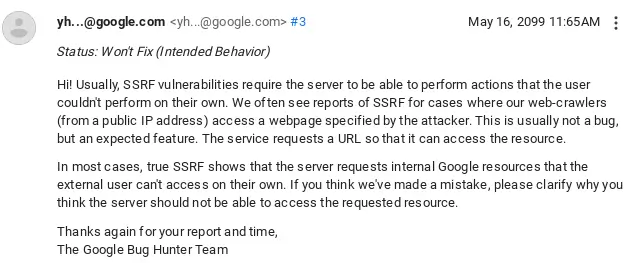
Sometimes you <a href="/common-google-xss">get lucky</a>, sometimes not. This time, google closed my report with “Intended Behavior”</p>

<p><img src="/assets/images/google-response-ssrf2.webp" alt="google response about ssrf" /></p>
<figcaption class="caption-center">
Google Response: this is not "true" SSRF, and this is the Intended Behavior.
</figcaption>

<p>I hope you enjoyed the article, and enjoyed this hidden intended feature of the appsheet :)</p>

<offwhite>
INSTANCE_IPS: 10.32.xx.xxx
</offwhite>]]></content><author><name>matan-h</name></author><category term="cyber" /><category term="cyber" /><category term="google" /><category term="ssrf" /><category term="base64" /><summary type="html"><![CDATA[An SSRF vulnerability in Google]]></summary><media:thumbnail xmlns:media="http://search.yahoo.com/mrss/" url="https://matan-h.com/assets/images/google-ssrf-info2.webp" /><media:content medium="image" url="https://matan-h.com/assets/images/google-ssrf-info2.webp" xmlns:media="http://search.yahoo.com/mrss/" /></entry><entry><title type="html">Common Google XSS</title><link href="https://matan-h.com/common-google-xss" rel="alternate" type="text/html" title="Common Google XSS" /><published>2024-05-06T08:23:22-04:00</published><updated>2024-05-06T08:23:22-04:00</updated><id>https://matan-h.com/boring-google-xss</id><content type="html" xml:base="https://matan-h.com/common-google-xss"><![CDATA[<p>When I was searching for a vulnerability in google DNS from Google Cloud, I came across <a href="https://www.rcesecurity.com/2017/03/ok-google-give-me-all-your-internal-dns-information">this</a> article by <a href="https://twitter.com/MrTuxracer">Julien Ahrens</a>. The article is about an SSRF vulnerability in the Google website <code class="language-plaintext highlighter-rouge">https://toolbox.googleapps.com</code>, so I started researching this site.</p>

<h2 id="simple-research--xss">Simple research ⇾ XSS</h2>

<p>The site has many apps, all of them are listed inside the <code class="language-plaintext highlighter-rouge">robots.txt</code> file:</p>

<div class="language-ini highlighter-rouge"><div class="highlight"><pre class="highlight"><code><span class="c">#apps-toolbox
</span><span class="na">User-Agent:</span><span class="w"> </span><span class="na">*</span><span class="w">
</span><span class="na">Allow:</span><span class="w"> </span><span class="na">/apps/main</span><span class="w">
</span><span class="na">Allow:</span><span class="w"> </span><span class="na">/apps/browserinfo</span><span class="w">
</span><span class="na">Allow:</span><span class="w"> </span><span class="na">/apps/checkmx</span><span class="w">
</span><span class="na">Allow:</span><span class="w"> </span><span class="na">/apps/dig</span><span class="w">
</span><span class="na">Allow:</span><span class="w"> </span><span class="na">/apps/har_analyzer</span><span class="w">
</span><span class="na">Allow:</span><span class="w"> </span><span class="na">/apps/loganalyzer</span><span class="w">
</span><span class="na">Allow:</span><span class="w"> </span><span class="na">/apps/loggershark</span><span class="w">
</span><span class="na">Allow:</span><span class="w"> </span><span class="na">/apps/messageheader</span><span class="w">
</span><span class="na">Allow:</span><span class="w"> </span><span class="na">/apps/recovery</span><span class="w">
</span><span class="na">Allow:</span><span class="w"> </span><span class="na">/apps/useragent</span><span class="w">
</span><span class="na">Allow:</span><span class="w"> </span><span class="na">/apps/other_tools</span><span class="w">
</span><span class="na">Allow:</span><span class="w"> </span><span class="na">/apps/encode_decode</span><span class="w">
</span><span class="na">Allow:</span><span class="w"> </span><span class="na">/apps/screen_recorder</span><span class="w">
</span><span class="na">Disallow:</span><span class="w"> </span><span class="na">*</span><span class="w">
</span></code></pre></div></div>

<p>Most of the tools are accessible from the /apps/main menu, however, the recovery app (at <code class="language-plaintext highlighter-rouge">/apps/recovery</code>) isn’t.</p>

<p>From a simple search in google I see the recovery app has these sub-pages:</p>

<div class="language-plaintext highlighter-rouge"><div class="highlight"><pre class="highlight"><code>recovery/domain_in_use
recovery/form
recovery/ownership
</code></pre></div></div>

<p>All of which receive many parameters from the query string in URL (parameters in <code class="language-plaintext highlighter-rouge">{url}?parm1=1&amp;param2=2...</code>): <code class="language-plaintext highlighter-rouge">visit_id</code>, <code class="language-plaintext highlighter-rouge">user</code>, <code class="language-plaintext highlighter-rouge">domain</code>, <code class="language-plaintext highlighter-rouge">email</code> and some more.</p>

<p>In google search I also spotted a result that has <code class="language-plaintext highlighter-rouge">Verify that you own example.com</code> title, with this link : <code class="language-plaintext highlighter-rouge">https://toolbox.googleapps.com/apps/recovery/ownership?domain=example.com&amp;email=email@example.com&amp;case=45500368&amp;continue=/apps/recovery/...</code></p>

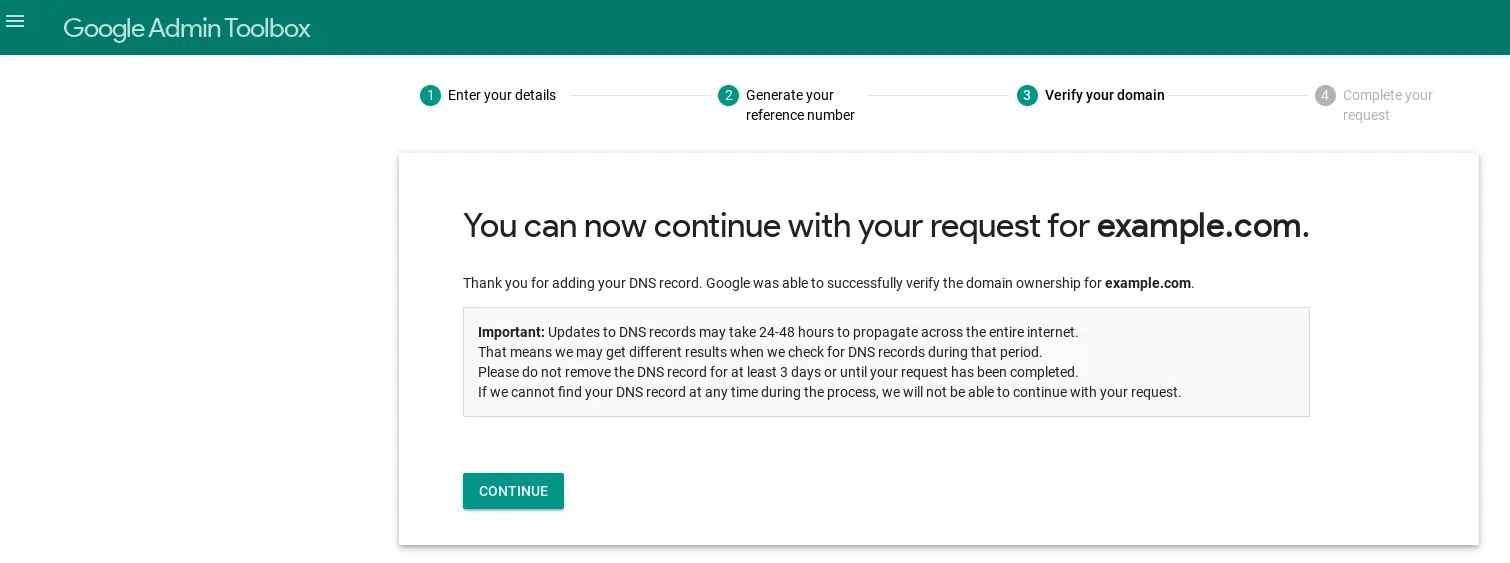
<p>The server apparently just verifies that the email matches the domain, then presents a page with some thank you text and a continue button:</p>

<p><img src="../assets/images/google-xss-continue-page.webp" title="screenshot of the google continue page" alt="google-continue-page.png" data-align="center" /></p>
<figcaption class="caption-center">google continue page</figcaption>

<p>And the link in the continue button, was … you guessed it: just taken from the <code class="language-plaintext highlighter-rouge">continue</code> URL parameter.</p>

<p>So I tried placing there <code class="language-plaintext highlighter-rouge">continue=javascript:alert(document.domain)</code>, and… It works!</p>

<p>The site didn’t use any CSP, or any protection at all. So I also could send and receive data from external sites: (e.g. <code class="language-plaintext highlighter-rouge">continue=javascript:fetch(%27https://api.ipify.org?format=json%27).then(response=%3Eresponse.text()).then(data=%3E{alert(data);%20})</code>, which <code class="language-plaintext highlighter-rouge">alert</code>s the user public ip). I reported it to Google.</p>

<h2 id="reward">Reward</h2>

<p><img src="../assets/images/google-xss-reward.webp" alt="google reward table screenshot" /></p>

<figcaption class="caption-center">google reward table screenshot.</figcaption>

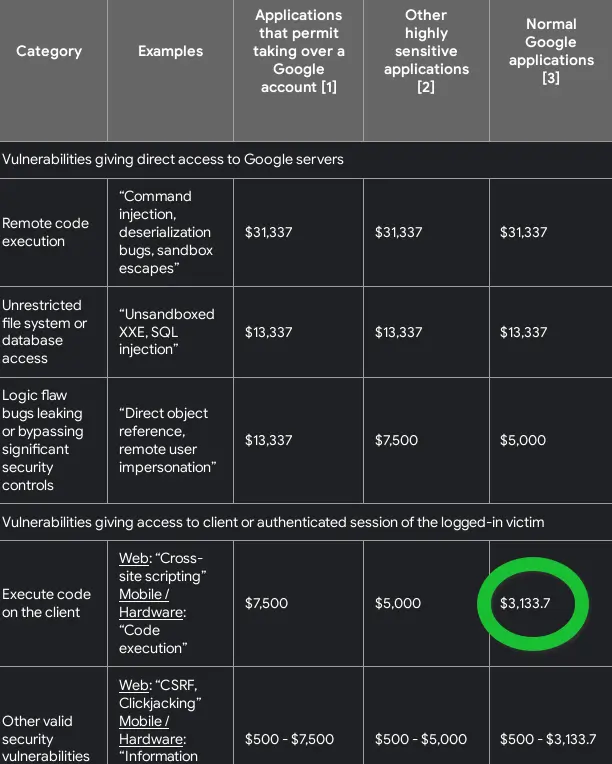
<p>Since this is an XSS, and its on a <code class="language-plaintext highlighter-rouge">normal Google application</code>, it falls into the <code class="language-plaintext highlighter-rouge">3133$</code> square in google rewards. Therefore, I got more than twice than I got to both <a href="https://matan-h.com/google-has-a-secret-browser-hidden-inside-the-settings">parental</a> <a href="https://matan-h.com/another-secret-browser">control</a> bypasses (googles secret browsers) combined.</p>

<p>I name this article “Common” because it’s really an <code class="language-plaintext highlighter-rouge">openredirect-&gt;xss</code> by the book. No thinking is required, just trying to change random parameters on URLs.</p>
<offwhite>
Did you find the Easter egg in this article?
</offwhite>

<div id="redirectButton"> </div>

<script>
// Congratulations! You've discovered the hidden Easter egg :)
var _continue = new URL(location.href).searchParams.get("continue")
if (_continue && _continue.includes(":")) {
    const style = `
.continue-button {
    color: #FFF;
    background-color:#009688;
    border: none;
    position: relative;
    height: 36px;
    margin: 0;
    min-width: 64px;
    padding: 0 16px;
    font-size: 14px;
    font-weight: 500;
    text-transform: uppercase;
    line-height: 1;
    letter-spacing: 0;
    outline: none;
    cursor: pointer;
    text-decoration: none;
    text-align: center;
    line-height: 36px;
    vertical-align: middle;
}
    `;
    // append the button style:
    const newStyle = document.createElement("style");
    newStyle.innerHTML = style;
    document.getElementsByTagName("head")[0].appendChild(newStyle);
    // append the button as <a> to div.
    const div = document.getElementById("redirectButton")
    const continueA = document.createElement('a');
    const continueBtn = document.createElement('button');
    continueBtn.innerText = "Continue to a super-safe URL"
    continueBtn.classList.add("continue-button")
    continueA.href = decodeURIComponent(_continue.trim())
    continueA.appendChild(continueBtn)
    div.appendChild(continueA)
}
else{
    // Let's notify people about the Easter egg, but only once in 7 times :)
    if (Math.floor(Math.random() * 7)===1){
    const url = new URL(location);url.searchParams.set("continue", "");history.pushState({},"",url)
    }
}

</script>]]></content><author><name>matan-h</name></author><category term="cyber" /><category term="cyber" /><category term="XSS" /><category term="google" /><summary type="html"><![CDATA[A simple XSS in Google application]]></summary><media:thumbnail xmlns:media="http://search.yahoo.com/mrss/" url="https://matan-h.com/assets/images/google-xss-continue-page.webp" /><media:content medium="image" url="https://matan-h.com/assets/images/google-xss-continue-page.webp" xmlns:media="http://search.yahoo.com/mrss/" /></entry><entry><title type="html">Google has another secret browser</title><link href="https://matan-h.com/another-secret-browser" rel="alternate" type="text/html" title="Google has another secret browser" /><published>2024-02-02T04:00:33-05:00</published><updated>2024-02-02T04:00:33-05:00</updated><id>https://matan-h.com/another-secret-browser</id><content type="html" xml:base="https://matan-h.com/another-secret-browser"><![CDATA[<p>I recently discovered [<a href="/google-has-a-secret-browser-hidden-inside-the-settings/">another</a>] secret browser that is inside Google Play Services. The uniqueness of this browser is that it is accessible by a link. That means, it not only bypasses the “normal” google parental control, it also bypasses the “lock-down” mode (the “lock-down” mode is the “your device has been locked” screen in parental control). I also discovered a similar method which can be used to bypass the <a href="https://support.google.com/android/answer/9455138">Android screen pinning</a> feature from the Contacts app
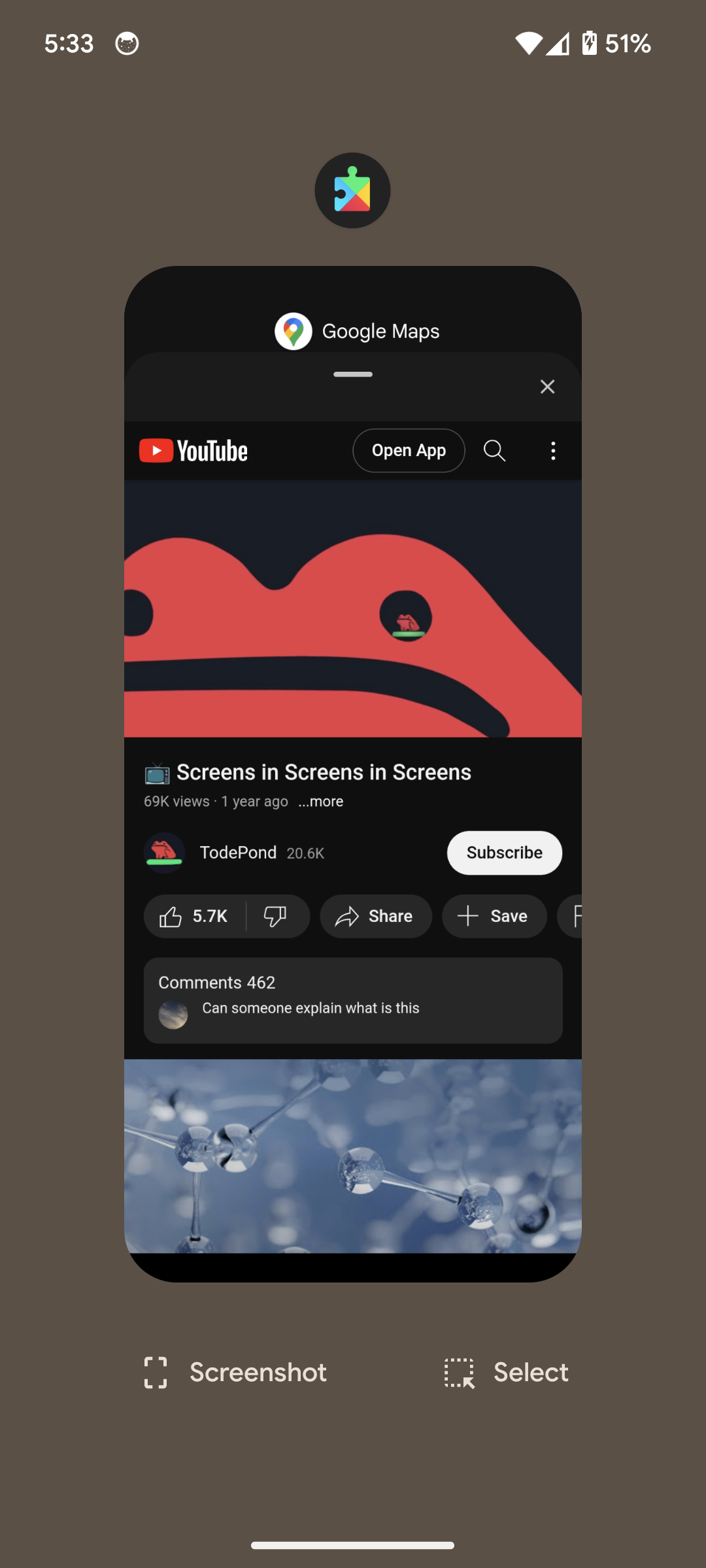
<img src="/assets/images/todepond-gms.png" alt="Todepond video in google play services app" class="p75" /></p>
<figcaption>
  <p><a href="https://www.youtube.com/@TodePond">TodePond</a> YouTube video in Google Play Services app</p>
</figcaption>

<h1 id="how-to-get-there">How to get there?</h1>
<ol>
  <li>Enter the Contacts app - using the “emergency call” button after the normal unlock of the phone. (assuming you not are reading this blog in lock-down mode, you can just open the normal Contacts app).</li>
  <li>Edit existing contact (or add new contact), then edit it, and scroll until “More fields” and click on it.</li>
  <li>In the “Website” field enter this website: “https://gds.google.com/gmsdrops”.</li>
  <li>Save the contact, then click on the link.</li>
  <li>You should now see “Your Android device just got better” (it’s a Google lie 🙂). Click “Show me”.</li>
  <li>Click “Learn more”. If you don’t have that, click “next” until you have it.</li>
  <li>Now you are in the browser. Resize it by moving it up. Click the hamburger menu, then click the big “Google Help” text.</li>
  <li>Click the hamburger menu again. This time just click “Google”.</li>
  <li>You may or may not be already signed in to this browser. If you are signed in, you can log out from Google. It does not affect your Chrome browser.
There you have it. A full untraceable browser inside the parental lock-down mode!</li>
</ol>

<h2 id="why-does-it-work">Why does it work?</h2>
<p>In lock-down mode, google “locks” all apps (including the android launcher and parts of the system) apart from “Google Play Services” (which is used to display the popup message and enforce restrictions) and the Contacts app (for phone).
As last time, It’s still the fault of the same app: <code class="language-plaintext highlighter-rouge">Google play services</code>. 
<code class="language-plaintext highlighter-rouge">https://gds.google.com/gmsdrops</code> is a deeplink to the Android “what’s new”. (you can also open it from here, and if your browser forwards deeplinks you probably get a message asking you if you want to continue to external app/google play).
While parental control doesn’t allow you to open deeplinks, it does allow the Contacts app to do so. When you click on the website field of a Contact, it’s the Contact app which opens the link. So it’s not blocked.</p>

<h1 id="screen-pinning-bypass">Screen pinning bypass</h1>
<p>android (11+) has an <a href="https://support.google.com/android/answer/9455138">Android screen pinning</a> feature, which basically make it possible to give your phone to someone, open on a specific app, and prevent the user to move to another without your permission. I haven’t done research on that, but I believe the most popular use-case is when you give your phone to someone to make a phone call.
This time we cannot use the same link as before, as screen-pinning prevents opening new apps, and the previous link opens the “Google Play Services” app.
But we can use another deeplink which is managed by the same app: <a href="https://podcasts.google.com">Google Podcast</a>. It’s possible because this deeplink is opened as a popup window instead of a full app.</p>

<ol>
  <li>Add website to contact in the same way as before. Enter the website “https://podcasts.google.com”</li>
  <li>Click the link when the app is pinned.</li>
  <li>You should now see the Google podcasts popup window. Click on the big icon of your Google account, then click “Content policies”. 
Now you are in the default browser. The exact place where you should not be when someone gives you their phone to call. For breakthrough use the same instructions as before:</li>
  <li>Click the hamburger menu, then click the big “Google Help” text.</li>
  <li>Click the hamburger menu again. This time just click “Google”.
You got it. A complete bypass.</li>
</ol>

<h1 id="google-response">Google Response</h1>
<p>I reported it to Google, as two different cases : one for parental control bypass, and another one for android screen pinning bypass.
They merged the parental one into the screen pinning bypass one, then they managed to “forget” about the duplicate cases.
This is the response I’ve on the screen bypassing case (because of course screen bypassing and parental controls <strong>is intended</strong> to be bypassed):
<img src="/assets/images/google-android-screenpin-intended.png" alt="Android screen pinning bypass is the intended behavior" /></p>
<figcaption class="caption-center">
Google answer : Android screen pinning bypassing is the intended behavior
</figcaption>

<p>and this confusing response about the duplication:
<img src="/assets/images/google-was-not-a-duplicate.png" alt="confusing google response about duplicate issues" /></p>
<figcaption class="caption-center">
  <p>Its not a duplicate. the issue was closed as duplicate of <em>potentially</em> another issue. It’s a seperate rewards program, and not our problem.</p>
</figcaption>
<hr />

<p>I hope you enjoy your secret untraceable browser.</p>]]></content><author><name>matan-h</name></author><category term="cyber" /><category term="android" /><category term="browser" /><category term="google" /><category term="hidden" /><category term="screen-pinning" /><category term="parental-control" /><summary type="html"><![CDATA[another hidden browser which is accessible by a link]]></summary><media:thumbnail xmlns:media="http://search.yahoo.com/mrss/" url="https://matan-h.com/assets/images/todepond-gms.png" /><media:content medium="image" url="https://matan-h.com/assets/images/todepond-gms.png" xmlns:media="http://search.yahoo.com/mrss/" /></entry><entry><title type="html">Build a quick and private online converter</title><link href="https://matan-h.com/build-quick-private-online-converter" rel="alternate" type="text/html" title="Build a quick and private online converter" /><published>2023-12-08T02:40:42-05:00</published><updated>2023-12-08T02:40:42-05:00</updated><id>https://matan-h.com/build-quick-private-online-converter</id><content type="html" xml:base="https://matan-h.com/build-quick-private-online-converter"><![CDATA[<p><img src="../assets/images/private-convert-recording.gif" alt="GIF of the /private-convert website" /></p>

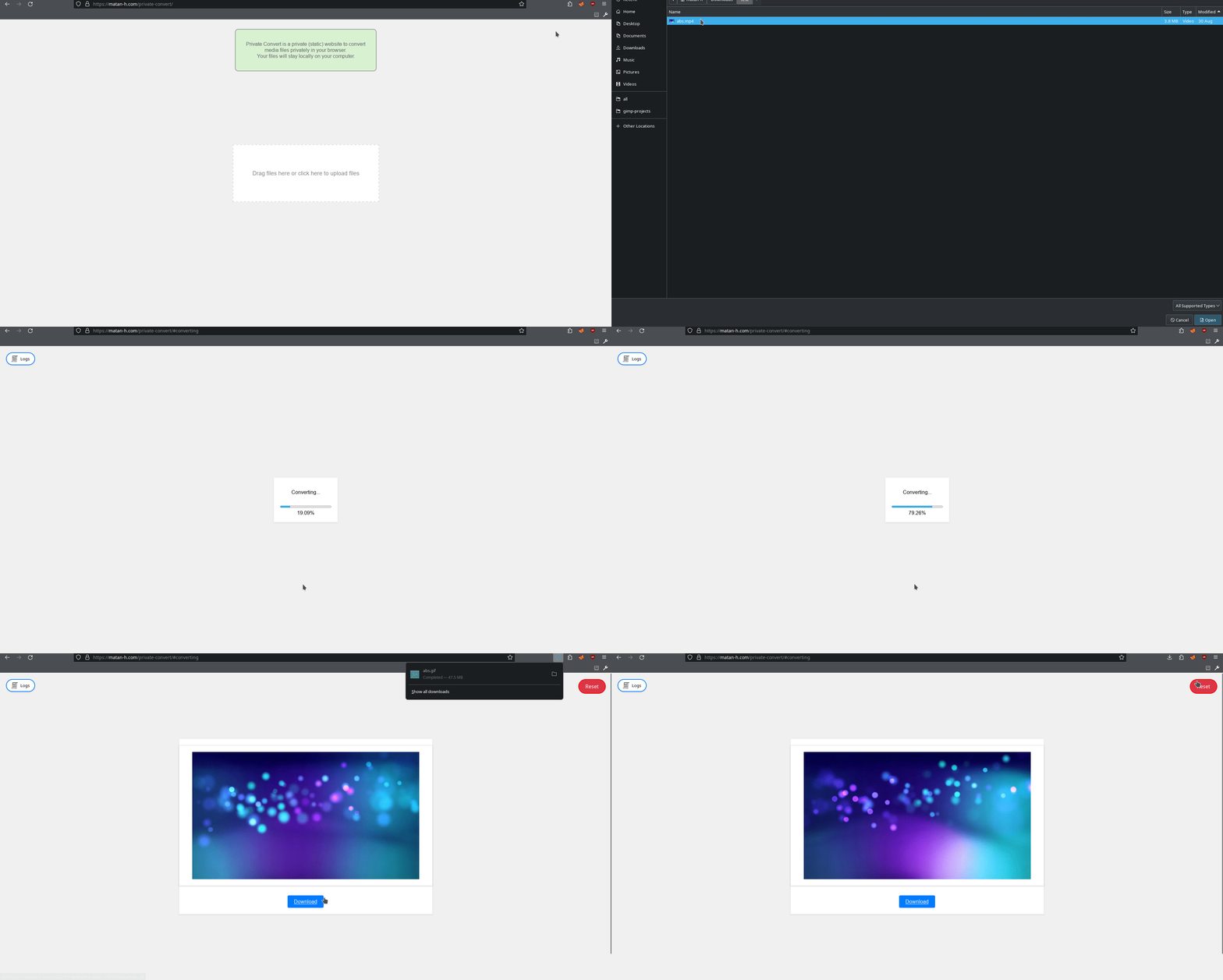
<p>It happens a lot that I need a media converter: for example, to convert mp4 to GIF, that I can send on WhatsApp.</p>

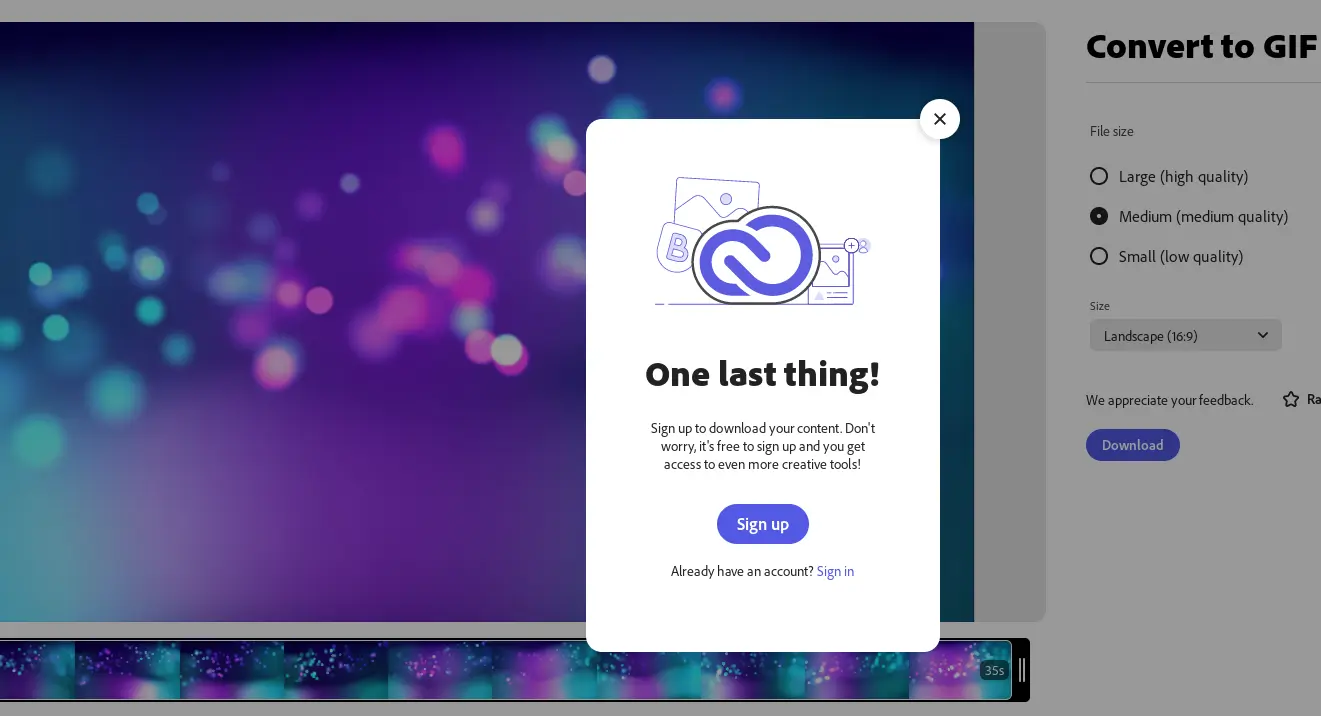
<p>What most people do is just search google for “mp4 to GIF online converter” and get a lot of sites that are either full of trackers and keep your data, or force you to create an account.</p>

<p><img title="" src="../assets/images/adobe-one-last-thing.webp" alt="screenshot of adobe asking for one last thing" width="714" data-align="inline" /></p>

<p>But the real problem began after I had a larger mp4, then most converters wouldn’t even let me upload, and those who do, have a very long upload time. So I was forced to use <code class="language-plaintext highlighter-rouge">ffmpeg</code> (FF MPEG command-line program to convert media), which is not a bad program, it’s just unintuitive (or has unintuitive defaults) to the level that instead of searching for an online converter I was searching “FFmpeg command mp4 to GIF” (the default is <code class="language-plaintext highlighter-rouge">ffmpeg -i inp.mp4 out.gif</code>, which just puts each frame of the mp4 inside the GIF, so for <code class="language-plaintext highlighter-rouge">3.6 mb</code> mp4 file I get <code class="language-plaintext highlighter-rouge">74  mb</code> GIF …)</p>

<p>So I built my own online converter.</p>

<h1 id="building-the-converter">building the converter</h1>

<h2 id="why-serverless">why serverless</h2>

<p>There are two approaches for conversion websites:</p>

<ol>
  <li>
    <p>The client upload the files to the server, it runs FFmpeg on each of them in a safe and orderly manner, and returns the output.</p>
  </li>
  <li>
    <p>The client uploads the files to the <code class="language-plaintext highlighter-rouge">javascript</code> on the website, and the JavaScript converts the files locally in the browser of the client. In this case, the server is used just to serve the HTML and JavaScript file (<code class="language-plaintext highlighter-rouge">serverless</code>).</p>
  </li>
</ol>

<p>In most cases of conversion, the first approach is the only approach that is possible, and this is the approach you see in google results.</p>

<table>
  <thead>
    <tr>
      <th>server (1)</th>
      <th>serverless (2)</th>
    </tr>
  </thead>
  <tbody>
    <tr>
      <td>can be used without JavaScript/ using API</td>
      <td>Relies on the user’s latest browser</td>
    </tr>
    <tr>
      <td>has upload-time</td>
      <td>doesn’t have upload time, but longer processing time.</td>
    </tr>
    <tr>
      <td>has a hard size limit</td>
      <td>there is no limit, and the maximum size is set by the client computer</td>
    </tr>
    <tr>
      <td>needs a lot of work to secure the server (for example, it may be easy to DOS, using a lot of maximum size files)</td>
      <td>no worries about server security and no rate limiting or maximum number of files a user can upload</td>
    </tr>
    <tr>
      <td>It’s really hard to become private.</td>
      <td>fully private - there is no server with your sensitive files.</td>
    </tr>
    <tr>
      <td>Expensive (Processing power)</td>
      <td>cheap/free (it’s just an HTML file)</td>
    </tr>
  </tbody>
</table>

<p>Since I moved recently <a href="https://matan-h.com/moving-from-wordpress-to-jekyll">from WordPress to jekyll</a> (from full server to serverless), as you can guess, I choose the <code class="language-plaintext highlighter-rouge">serverless</code> approach.</p>

<h3 id="ffmpeg">FFmpeg</h3>

<p>There is something special regarding media conversion sites: most of them use the same open source tool, just with different frontend and options. This awesome tool is called <a href="https://ffmpeg.org/"><code class="language-plaintext highlighter-rouge">FFmpeg</code></a> (or <code class="language-plaintext highlighter-rouge">Fast Forward  Moving Picture Experts Group</code>), and it’s written in c.</p>

<p>But there is one problem. How to run this serverless? You can’t just run c code on a browser and expect it to work. But with <a href="https://webassembly.org">WebAssembly</a>, it’s possible. Still, the FFmpeg code is not really WAsm-compatible.</p>

<p>But someone ported FFmpeg (using Emscripten) to WebAssembly, and created the awesome <a href="https://ffmpegwasm.netlify.app"><code class="language-plaintext highlighter-rouge">ffmpeg.wasm</code></a> and even created a JavaScript/typescript interface for it.</p>

<p>So, after we know how FFmpeg can run in the client browser, let’s get started.</p>

<h2 id="start-the-project">start the project</h2>

<p><strong>spoiler</strong>: the converter is online at this site at <a href="https://matan-h.com/private-convert"><code class="language-plaintext highlighter-rouge">/private-convert</code></a></p>

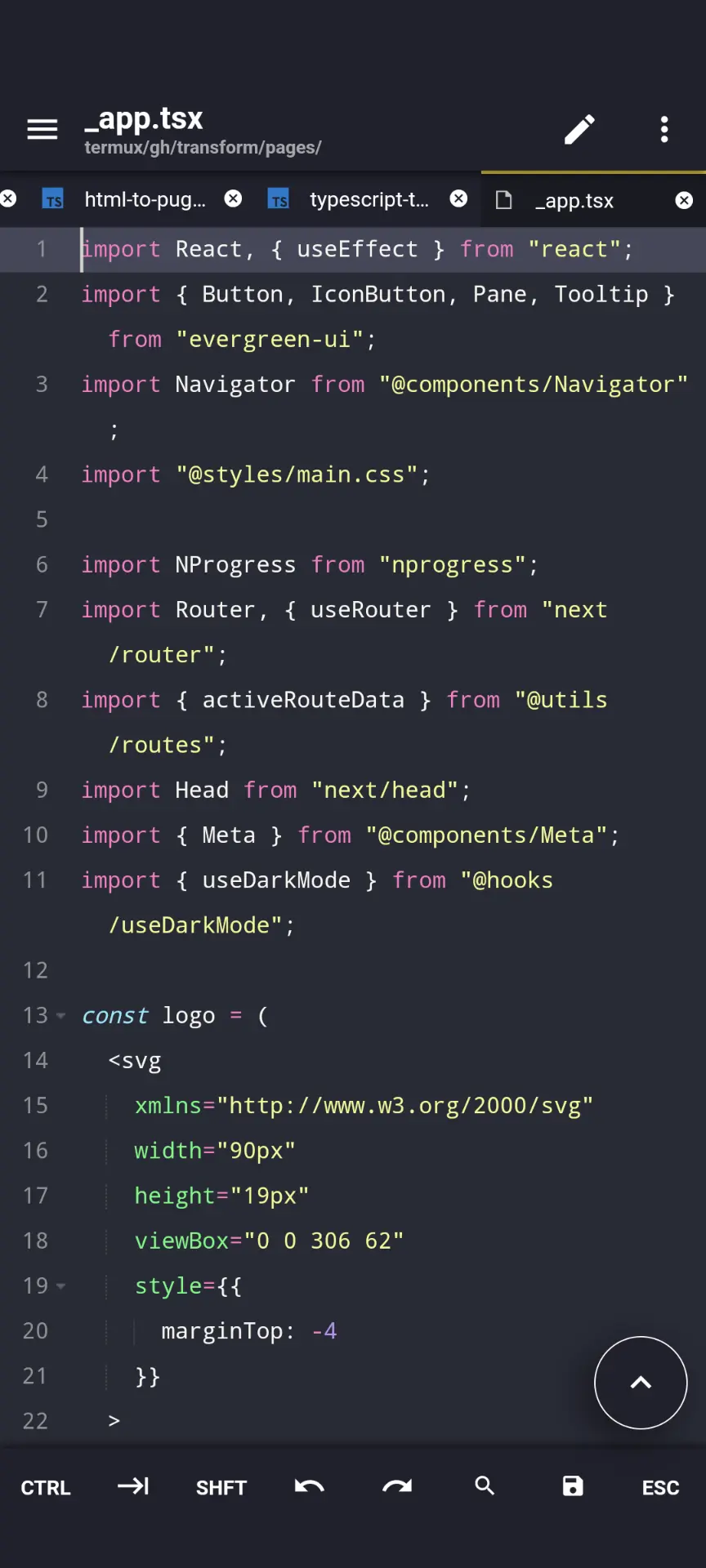
<p>Let’s start the project. I want to leverage the typescript interface that <code class="language-plaintext highlighter-rouge">ffmpeg.wasm</code> has, so I use <code class="language-plaintext highlighter-rouge">create-react-app</code> from <a href="https://github.com/facebook/create-react-app">Facebook</a>:</p>

<div class="language-bash highlighter-rouge"><div class="highlight"><pre class="highlight"><code>yarn create react-app my-converter <span class="nt">--template</span> typescript
</code></pre></div></div>

<p>The first thing you need is an interface. I don’t really like designing everything from scratch, so I used ChatGPT/Bard to write a simple interface. They wrote a lot of code (you can look at it in this <a href="https://github.com/matan-h/private-convert/commit/aaf644296c646526b1aa2c5f79cb82701b67b22">commit</a>), but here is the important code:</p>

<div class="language-typescript highlighter-rouge"><div class="highlight"><pre class="highlight"><code><span class="kr">enum</span> <span class="nx">Screen</span> <span class="p">{</span>
  <span class="nx">UPLOAD</span><span class="p">,</span>
  <span class="nx">PREVIEW</span><span class="p">,</span>
  <span class="nx">CONVERTING</span><span class="p">,</span>
  <span class="nx">CONVERTED</span>
<span class="p">}</span>
<span class="kd">const</span> <span class="nx">App</span><span class="p">:</span> <span class="nx">React</span><span class="p">.</span><span class="nx">FC</span> <span class="o">=</span> <span class="p">()</span> <span class="o">=&gt;</span> <span class="p">{</span>
  <span class="kd">const</span> <span class="p">[</span><span class="nx">currentScreen</span><span class="p">,</span> <span class="nx">setCurrentScreen</span><span class="p">]</span> <span class="o">=</span> <span class="nx">useState</span><span class="o">&lt;</span><span class="nx">Screen</span><span class="o">&gt;</span><span class="p">(</span><span class="nx">Screen</span><span class="p">.</span><span class="nx">UPLOAD</span><span class="p">);</span>
  <span class="kd">const</span> <span class="p">[</span><span class="nx">selectedFiles</span><span class="p">,</span> <span class="nx">setSelectedFiles</span><span class="p">]</span> <span class="o">=</span> <span class="nx">useState</span><span class="o">&lt;</span><span class="nx">FileList</span> <span class="o">|</span> <span class="kc">null</span><span class="o">&gt;</span><span class="p">(</span><span class="kc">null</span><span class="p">);</span>
  <span class="kd">const</span> <span class="p">[</span><span class="nx">convertedFile</span><span class="p">,</span> <span class="nx">setConvertedFile</span><span class="p">]</span> <span class="o">=</span> <span class="nx">useState</span><span class="o">&lt;</span><span class="nx">File</span> <span class="o">|</span> <span class="kc">null</span><span class="o">&gt;</span><span class="p">(</span><span class="kc">null</span><span class="p">);</span>
  <span class="kd">const</span> <span class="p">[</span><span class="nx">conversionProgress</span><span class="p">,</span> <span class="nx">setConversionProgress</span><span class="p">]</span> <span class="o">=</span> <span class="nx">useState</span><span class="o">&lt;</span><span class="kr">number</span><span class="o">&gt;</span><span class="p">(</span><span class="mi">0</span><span class="p">);</span>
<span class="p">...</span>
  <span class="kd">const</span> <span class="nx">handleReset</span> <span class="o">=</span> <span class="p">()</span> <span class="o">=&gt;</span> <span class="p">{</span>
    <span class="nf">setSelectedFiles</span><span class="p">(</span><span class="kc">null</span><span class="p">);</span>
    <span class="nf">setConvertedFile</span><span class="p">(</span><span class="kc">null</span><span class="p">);</span>
    <span class="nf">setConversionProgress</span><span class="p">(</span><span class="mi">0</span><span class="p">);</span>
    <span class="nf">setCurrentScreen</span><span class="p">(</span><span class="nx">Screen</span><span class="p">.</span><span class="nx">UPLOAD</span><span class="p">);</span>
  <span class="p">};</span>
  <span class="kd">const</span> <span class="nx">handleConvert</span> <span class="o">=</span> <span class="p">()</span> <span class="o">=&gt;</span> <span class="p">{</span>
    <span class="nf">setCurrentScreen</span><span class="p">(</span><span class="nx">Screen</span><span class="p">.</span><span class="nx">CONVERTING</span><span class="p">);</span>
    <span class="nf">simulateConversion</span><span class="p">();</span> <span class="c1">// Placeholder for actual conversion logic</span>
  <span class="p">};</span>
  <span class="kd">const</span> <span class="nx">renderScreen</span> <span class="o">=</span> <span class="p">()</span> <span class="o">=&gt;</span> <span class="p">{</span>
    <span class="k">switch </span><span class="p">(</span><span class="nx">currentScreen</span><span class="p">)</span> <span class="p">{</span>
      <span class="k">case</span> <span class="nx">Screen</span><span class="p">.</span><span class="na">UPLOAD</span><span class="p">:</span>
        <span class="k">return </span><span class="p">(</span><span class="o">&lt;</span><span class="nx">input</span> <span class="kd">type</span><span class="o">=</span><span class="dl">"</span><span class="s2">file</span><span class="dl">"</span> <span class="nx">multiple</span> <span class="nx">onChange</span><span class="o">=</span><span class="p">{</span><span class="nx">handleFileUpload</span><span class="p">}</span> <span class="sr">/&gt;</span><span class="err">)
</span>      <span class="k">case</span> <span class="nx">Screen</span><span class="p">.</span><span class="na">PREVIEW</span><span class="p">:</span>
        <span class="k">return </span><span class="p">(</span>
          <span class="o">&lt;</span><span class="nx">div</span> <span class="nx">className</span><span class="o">=</span><span class="dl">"</span><span class="s2">content</span><span class="dl">"</span><span class="o">&gt;</span>
            <span class="p">{</span><span class="cm">/* Display preview of uploaded files */</span><span class="p">}</span>
            <span class="o">&lt;</span><span class="nx">select</span> <span class="nx">className</span><span class="o">=</span><span class="dl">"</span><span class="s2">dropdown</span><span class="dl">"</span><span class="o">&gt;</span>
              <span class="p">{</span><span class="cm">/* Dropdown for "convert to" options */</span><span class="p">}</span>
            <span class="o">&lt;</span><span class="sr">/select</span><span class="err">&gt;
</span>            <span class="o">&lt;</span><span class="nx">button</span> <span class="nx">className</span><span class="o">=</span><span class="dl">"</span><span class="s2">action-button</span><span class="dl">"</span> <span class="nx">onClick</span><span class="o">=</span><span class="p">{</span><span class="nx">handleReset</span><span class="p">}</span><span class="o">&gt;</span><span class="nx">Reset</span><span class="o">&lt;</span><span class="sr">/button</span><span class="err">&gt;
</span>            <span class="o">&lt;</span><span class="nx">button</span> <span class="nx">className</span><span class="o">=</span><span class="dl">"</span><span class="s2">action-button</span><span class="dl">"</span> <span class="nx">onClick</span><span class="o">=</span><span class="p">{</span><span class="nx">handleConvert</span><span class="p">}</span><span class="o">&gt;</span><span class="nx">Convert</span><span class="o">&lt;</span><span class="sr">/button</span><span class="err">&gt;
</span>        <span class="p">)</span>
      <span class="k">case</span> <span class="nx">Screen</span><span class="p">.</span><span class="na">CONVERTING</span><span class="p">:</span>
        <span class="k">return </span><span class="p">(</span><span class="o">&lt;</span><span class="nx">p</span><span class="o">&gt;</span><span class="nx">Converting</span><span class="p">...</span><span class="o">&lt;</span><span class="sr">/p&gt;</span><span class="err">)
</span>      <span class="k">case</span> <span class="nx">Screen</span><span class="p">.</span><span class="na">CONVERTED</span><span class="p">:</span>
        <span class="k">return </span><span class="p">(</span><span class="o">&lt;</span><span class="nx">button</span> <span class="nx">className</span><span class="o">=</span><span class="dl">"</span><span class="s2">action-button</span><span class="dl">"</span><span class="o">&gt;</span><span class="nx">Download</span><span class="o">&lt;</span><span class="sr">/button&gt;</span><span class="err">)
</span></code></pre></div></div>

<p>The code defines 4 states the site can be on:</p>

<ol>
  <li>
    <p><code class="language-plaintext highlighter-rouge">upload</code> - where the user uploads the file</p>
  </li>
  <li>
    <p><code class="language-plaintext highlighter-rouge">preview</code> - where the user chooses which format they want as a target</p>
  </li>
  <li>
    <p>processing (<code class="language-plaintext highlighter-rouge">converting</code>) - a ProgressBar while the file is being processed</p>
  </li>
  <li>
    <p>download (<code class="language-plaintext highlighter-rouge">converted</code>) - where the user can download the converted files.</p>
  </li>
</ol>

<p>Great. Now we have an interface, and we can continue to the interesting part : the conversion.</p>

<h2 id="the-conversion">The Conversion</h2>

<p>There are two versions of <code class="language-plaintext highlighter-rouge">ffmpeg.wasm</code>, the multi-thread (called <code class="language-plaintext highlighter-rouge">@ffmpeg/core-mt</code>) and the single-threaded (called <code class="language-plaintext highlighter-rouge">@ffmpeg/core</code>). Sometimes Chromium-based browsers do <a href="https://github.com/ffmpegwasm/ffmpeg.wasm/issues/530">not support multi-thread</a>. The single-threaded works on all browsers, but it’s much slower compared to the multithreaded version. So let’s load the multithreaded version only on Firefox. Here is the load function: (this file is also <a href="https://github.com/matan-h/private-convert/blob/bc5d2e5a0c05b8ce48e28eec5f20608c43a69555/src/utils/FFmpegCls.tsx">here</a>)</p>

<div class="language-typescript highlighter-rouge"><div class="highlight"><pre class="highlight"><code><span class="k">import</span> <span class="p">{</span> <span class="nx">FFmpeg</span> <span class="kd">as </span><span class="nx">FFmpegCore</span> <span class="p">}</span> <span class="k">from</span> <span class="dl">"</span><span class="s2">@ffmpeg/ffmpeg</span><span class="dl">"</span><span class="p">;</span>
<span class="k">import</span> <span class="p">{</span> <span class="nx">toBlobURL</span><span class="p">,</span> <span class="nx">fetchFile</span> <span class="p">}</span> <span class="k">from</span> <span class="dl">"</span><span class="s2">@ffmpeg/util</span><span class="dl">"</span><span class="p">;</span>
<span class="kd">class</span> <span class="nc">ffmpegCls</span> <span class="p">{</span>
<span class="p">...</span>
  <span class="k">async</span> <span class="nf">load</span><span class="p">():</span> <span class="nb">Promise</span><span class="o">&lt;</span><span class="k">void</span><span class="o">&gt;</span> <span class="p">{</span>
    <span class="kd">let</span> <span class="nx">is_firefox</span> <span class="o">=</span> <span class="nb">navigator</span><span class="p">.</span><span class="nx">userAgent</span><span class="p">.</span><span class="nf">toLowerCase</span><span class="p">().</span><span class="nf">includes</span><span class="p">(</span><span class="dl">'</span><span class="s1">firefox</span><span class="dl">'</span><span class="p">);</span>
    <span class="kd">let</span> <span class="nx">core_path</span> <span class="o">=</span> <span class="nx">is_firefox</span> <span class="p">?</span> <span class="dl">"</span><span class="s2">core-mt</span><span class="dl">"</span> <span class="p">:</span> <span class="dl">"</span><span class="s2">core</span><span class="dl">"</span>
    <span class="kd">const</span> <span class="nx">base_url</span> <span class="o">=</span>  <span class="s2">`https://unpkg.com/@ffmpeg/</span><span class="p">${</span><span class="nx">core_path</span><span class="p">}</span><span class="s2">@0.12.2/dist/umd`</span>
    <span class="nx">console</span><span class="p">.</span><span class="nf">log</span><span class="p">(</span><span class="dl">"</span><span class="s2">loading ffmpeg from</span><span class="dl">"</span><span class="p">,</span><span class="nx">core_path</span><span class="p">,</span><span class="dl">"</span><span class="s2">is_firefox:</span><span class="dl">"</span><span class="p">,</span><span class="nx">is_firefox</span><span class="p">)</span>
    <span class="kd">let</span> <span class="nx">coreblob</span> <span class="o">=</span> <span class="k">await</span> <span class="nf">toBlobURL</span><span class="p">(</span>
      <span class="s2">`</span><span class="p">${</span><span class="nx">base_url</span><span class="p">}</span><span class="s2">/ffmpeg-core.js`</span><span class="p">,</span>
      <span class="dl">"</span><span class="s2">text/javascript</span><span class="dl">"</span><span class="p">,</span>
    <span class="p">)</span>
    <span class="kd">let</span> <span class="nx">wasmblob</span> <span class="o">=</span> <span class="k">await</span> <span class="nf">toBlobURL</span><span class="p">(</span>
      <span class="s2">`</span><span class="p">${</span><span class="nx">base_url</span><span class="p">}</span><span class="s2">/ffmpeg-core.wasm`</span><span class="p">,</span>
      <span class="dl">"</span><span class="s2">application/wasm</span><span class="dl">"</span><span class="p">,</span>
    <span class="p">)</span>
<span class="p">...</span>
    <span class="k">await</span> <span class="k">this</span><span class="p">.</span><span class="nx">ffmpeg</span><span class="p">.</span><span class="nf">load</span><span class="p">({</span>
      <span class="na">coreURL</span><span class="p">:</span> <span class="nx">coreblob</span><span class="p">,</span>
      <span class="na">wasmURL</span><span class="p">:</span> <span class="nx">wasmblob</span><span class="p">,</span>
      <span class="na">workerURL</span><span class="p">:</span> <span class="nx">workerblob</span>
    <span class="p">});</span>
    <span class="k">this</span><span class="p">.</span><span class="nx">loaded</span> <span class="o">=</span> <span class="kc">true</span><span class="p">;</span>

  <span class="p">}</span>
</code></pre></div></div>

<p>Which loads the correct WAsm version based on the browser.</p>

<p>Let’s also define a function to run the FFmpeg command:</p>

<div class="language-typescript highlighter-rouge"><div class="highlight"><pre class="highlight"><code>  <span class="k">async</span> <span class="nf">exec</span><span class="p">(</span><span class="nx">inputFileName</span><span class="p">:</span> <span class="kr">string</span><span class="p">,</span> <span class="nx">OutputMimeType</span><span class="p">:</span> <span class="kr">string</span><span class="p">,</span> <span class="nx">inputBlob</span><span class="p">:</span> <span class="kr">string</span><span class="p">,</span> <span class="nx">outputFile</span><span class="p">:</span> <span class="kr">string</span><span class="p">,</span> <span class="nx">args</span><span class="p">:</span> <span class="kr">string</span><span class="p">[]):</span> <span class="nb">Promise</span><span class="o">&lt;</span><span class="nx">File</span><span class="o">&gt;</span> <span class="p">{</span>
<span class="p">...</span>
    <span class="k">await</span> <span class="k">this</span><span class="p">.</span><span class="nx">ffmpeg</span><span class="p">.</span><span class="nf">writeFile</span><span class="p">(</span><span class="nx">inputFileName</span><span class="p">,</span> <span class="k">await</span> <span class="nf">fetchFile</span><span class="p">(</span><span class="nx">inputBlob</span><span class="p">));</span>
    <span class="kd">const</span> <span class="nx">commandList</span> <span class="o">=</span> <span class="p">[</span><span class="dl">"</span><span class="s2">-hide_banner</span><span class="dl">"</span><span class="p">,</span> <span class="dl">"</span><span class="s2">-i</span><span class="dl">"</span><span class="p">,</span> <span class="nx">inputFileName</span><span class="p">,</span> <span class="p">...</span><span class="nx">args</span><span class="p">,</span> <span class="nx">outputFile</span><span class="p">].</span><span class="nf">filter</span><span class="p">(</span><span class="nx">el</span> <span class="o">=&gt;</span> <span class="p">(</span><span class="nx">el</span> <span class="o">!==</span> <span class="dl">''</span><span class="p">))</span> <span class="c1">// remove empty strings</span>
    <span class="nx">console</span><span class="p">.</span><span class="nf">log</span><span class="p">(</span><span class="s2">`running ffmpeg command [</span><span class="p">${</span><span class="nx">commandList</span><span class="p">}</span><span class="s2">]`</span><span class="p">)</span>
    <span class="k">await</span> <span class="k">this</span><span class="p">.</span><span class="nx">ffmpeg</span><span class="p">.</span><span class="nf">exec</span><span class="p">(</span><span class="nx">commandList</span><span class="p">);</span>

    <span class="kd">const</span> <span class="nx">data</span> <span class="o">=</span> <span class="k">await</span> <span class="k">this</span><span class="p">.</span><span class="nx">ffmpeg</span><span class="p">.</span><span class="nf">readFile</span><span class="p">(</span><span class="nx">outputFile</span><span class="p">);</span>
    <span class="kd">const</span> <span class="nx">blob</span> <span class="o">=</span> <span class="k">new</span> <span class="nc">Blob</span><span class="p">([</span><span class="nx">data</span><span class="p">],</span> <span class="p">{</span> <span class="na">type</span><span class="p">:</span> <span class="nx">OutputMimeType</span> <span class="p">});</span>
    <span class="k">return</span> <span class="k">new</span> <span class="nc">File</span><span class="p">([</span><span class="nx">blob</span><span class="p">],</span> <span class="nx">outputFile</span><span class="p">,</span> <span class="p">{</span> <span class="na">type</span><span class="p">:</span> <span class="nx">OutputMimeType</span> <span class="p">})</span>
  <span class="p">}</span>  
</code></pre></div></div>

<p>Good. Now we have class to load FFmpeg, and a function that runs commands on an input file and gets an output file. But the <code class="language-plaintext highlighter-rouge">exec</code> function we defined takes some parameters we don’t know:</p>

<ol>
  <li>
    <p><code class="language-plaintext highlighter-rouge">inputFIleName,inputBlob, OutputFile</code> - we know. The input is what the user supplied and the output just replaces the extension.</p>
  </li>
  <li>
    <p><code class="language-plaintext highlighter-rouge">OutputMimeType</code> - we need a map <code class="language-plaintext highlighter-rouge">{ext_format: mimetype}</code></p>
  </li>
  <li>
    <p><code class="language-plaintext highlighter-rouge">args</code> - we need a map <code class="language-plaintext highlighter-rouge">{conversion_type: args}</code></p>
  </li>
</ol>

<p><code class="language-plaintext highlighter-rouge">OutputMimeType</code> is necessary so that the browser knows how to save and display it, and <code class="language-plaintext highlighter-rouge">args</code> is necessary to change the default behavior of FFmpeg because otherwise we will have things like <code class="language-plaintext highlighter-rouge">74 mb</code> GIF from <code class="language-plaintext highlighter-rouge">3.6 mb</code> MP4.</p>

<h2 id="the-map">The map</h2>

<p>Let’s define the convert option:</p>

<div class="language-typescript highlighter-rouge"><div class="highlight"><pre class="highlight"><code><span class="k">export</span> <span class="kr">interface</span> <span class="nx">ConvertOption</span> <span class="p">{</span>
  <span class="nl">extension</span><span class="p">:</span> <span class="kr">string</span><span class="p">;</span> <span class="c1">// for example "mp4"</span>
  <span class="nl">mimetype</span><span class="p">:</span> <span class="kr">string</span><span class="p">;</span> <span class="c1">// for example "video/mp4"</span>
  <span class="nl">full_string</span><span class="p">:</span> <span class="kr">string</span><span class="p">;</span> <span class="c1">// for example "MPEG-4 Video"</span>
  <span class="nl">optional_convert_routes</span><span class="p">:</span> <span class="nx">ConvertRoutes</span><span class="p">;</span> <span class="c1">// for example: {mkv: ["-vcodec","copy"]}</span>
<span class="p">}</span>
</code></pre></div></div>

<p>then, we can define the “standard/normal FFmpeg args” for <em>most</em> video formats:</p>

<div class="language-typescript highlighter-rouge"><div class="highlight"><pre class="highlight"><code><span class="kr">interface</span> <span class="nx">ConvertRoutes</span> <span class="p">{</span>
  <span class="p">[</span><span class="nx">format</span><span class="p">:</span> <span class="kr">string</span><span class="p">]:</span> <span class="kr">string</span><span class="p">[];</span>
<span class="p">}</span>
<span class="kd">const</span> <span class="nx">normalVideoRoutes_video</span><span class="p">:</span> <span class="nx">ConvertRoutes</span> <span class="o">=</span> <span class="p">{</span>
  <span class="na">mp4</span><span class="p">:</span> <span class="p">[],</span>
  <span class="na">mkv</span><span class="p">:</span> <span class="p">[</span><span class="dl">"</span><span class="s2">-vcodec</span><span class="dl">"</span><span class="p">,</span><span class="dl">"</span><span class="s2">copy</span><span class="dl">"</span><span class="p">],</span>
  <span class="na">avi</span><span class="p">:</span> <span class="p">[],</span>
<span class="p">};</span>
</code></pre></div></div>

<p>and finally write the map (you can look on the full map at <a href="https://github.com/matan-h/private-convert/blob/main/src/utils/convertOptionsFull.ts">this file</a>):</p>

<div class="language-typescript highlighter-rouge"><div class="highlight"><pre class="highlight"><code><span class="kr">interface</span> <span class="nx">ConvertOptionsType</span> <span class="p">{</span>
  <span class="p">[</span><span class="nx">extension</span><span class="p">:</span> <span class="kr">string</span><span class="p">]:</span> <span class="nx">ConvertOption</span><span class="p">;</span>
<span class="p">}</span>
<span class="k">export</span> <span class="kd">const</span> <span class="nx">ConvertOptions</span><span class="p">:</span> <span class="nx">ConvertOptionsType</span> <span class="o">=</span> <span class="p">{</span>
  <span class="c1">// -- video</span>
  <span class="na">mp4</span><span class="p">:</span> <span class="p">{</span>
    <span class="na">extension</span><span class="p">:</span> <span class="dl">"</span><span class="s2">mp4</span><span class="dl">"</span><span class="p">,</span>
    <span class="na">mimetype</span><span class="p">:</span> <span class="dl">"</span><span class="s2">video/mp4</span><span class="dl">"</span><span class="p">,</span>
    <span class="na">full_string</span><span class="p">:</span> <span class="dl">"</span><span class="s2">MPEG-4 Video</span><span class="dl">"</span><span class="p">,</span>
    <span class="na">optional_convert_routes</span><span class="p">:</span> <span class="nx">normalVideoRoutes</span><span class="p">,</span>
  <span class="p">},</span>
  <span class="na">mkv</span><span class="p">:</span> <span class="p">{</span>
    <span class="na">extension</span><span class="p">:</span> <span class="dl">"</span><span class="s2">mkv</span><span class="dl">"</span><span class="p">,</span>
    <span class="na">mimetype</span><span class="p">:</span> <span class="dl">"</span><span class="s2">video/matroska</span><span class="dl">"</span><span class="p">,</span>
    <span class="na">full_string</span><span class="p">:</span> <span class="dl">"</span><span class="s2">Matroska Video</span><span class="dl">"</span><span class="p">,</span>
    <span class="na">optional_convert_routes</span><span class="p">:</span> <span class="nf">copyWith</span><span class="p">(</span><span class="nx">normalVideoRoutes</span><span class="p">,</span> <span class="p">{</span>
      <span class="na">mp4</span><span class="p">:</span> <span class="p">[</span><span class="dl">"</span><span class="s2">-codec</span><span class="dl">"</span><span class="p">,</span><span class="dl">"</span><span class="s2">copy</span><span class="dl">"</span><span class="p">],</span>
    <span class="p">}),</span>
  <span class="p">},</span>
</code></pre></div></div>

<p>I added some more features (for example, multi-files, FFmpeg logs). You can look at the <a href="https://github.com/matan-h/private-convert/blob/main/src/App.ts">final App.tsx on my GitHub</a>, or just enjoy it right now: online at <a href="https://matan-h.com/private-convert"><code class="language-plaintext highlighter-rouge">/private-convert</code></a></p>

<p>I hope you enjoy it and if you have any Idea how to make it better, let me know in the comment section, or just with issue or pull request to the <code class="language-plaintext highlighter-rouge">private-convert</code> <a href="https://github.com/matan-h/private-convert">GitHub Repo</a>.</p>]]></content><author><name>matan-h</name></author><category term="dev-program" /><category term="code" /><category term="converter" /><category term="development" /><category term="ffmpeg" /><category term="media" /><category term="program" /><category term="utility" /><category term="website" /><category term="react" /><summary type="html"><![CDATA[Build a quick and private online converter using WebAssembly (ffmpeg.wasm)]]></summary><media:thumbnail xmlns:media="http://search.yahoo.com/mrss/" url="https://matan-h.com/assets/images/private-convert-recording.gif" /><media:content medium="image" url="https://matan-h.com/assets/images/private-convert-recording.gif" xmlns:media="http://search.yahoo.com/mrss/" /></entry><entry><title type="html">I analyzed stackoverflow</title><link href="https://matan-h.com/analyze-stackoverflow" rel="alternate" type="text/html" title="I analyzed stackoverflow" /><published>2023-11-15T09:33:28-05:00</published><updated>2023-11-15T09:33:28-05:00</updated><id>https://matan-h.com/analyze-stackoverflow</id><content type="html" xml:base="https://matan-h.com/analyze-stackoverflow"><![CDATA[<script src="https://cdn.jsdelivr.net/npm/chart.js"></script>

<h2 id="backstory">backstory</h2>

<p>I read hackernews sometimes, and articles like <a href="https://py-code.org/stats">I mirrored all the code from PyPI to GitHub and analysed it</a> made me think, maybe there are less obvious places with leaked information.</p>

<p>This was in the back of my mind until recently, when I tried to <a href="https://github.com/kivy/buildozer/pull/1709">contribute</a> to the <a href="https://github.com/kivy/buildozer">buildozer</a> project. 
I implemented rich logs, and I felt like I understood buildozer, so I searched for <a href="https://stackoverflow.com/tags/buildozer">stackoverflow</a> questions about it. Then I discovered that buildozer, <a href="https://github.com/beeware/briefcase/blob/4db325af8381789ad5e049fb80bb4f03d1810208/src/briefcase/console.py#L402">unlike beeware</a> , actually dumps the <a href="https://github.com/kivy/buildozer/blob/dda7eaaf94d56813f48570b277752318555301f6/buildozer/logger.py#L81">full</a> environment when a command fails (for example output, see <a href="https://stackoverflow.com/questions/66628535/facing-buildozer-error-stating-command-failed">this</a> old question), and thought “what if this user built the app with a sensitive api ?”</p>

<p><img src="/assets/images/stackoverflow-random-data2.webp" alt="screenshot of stackoverflow quistion with random (fake) ghp tokens instead of the buildozer logs. " class="centered" /></p>

<h1 id="parsing">parsing</h1>

<p>So, I downloaded stackOverflow from the <a href="https://archive.org/download/stackexchange">stackexchange archive.org dump</a>, and started to think how to parse it. It’s a huge (103G) XML file, where each line is a question or answer.</p>

<p>I tried different “leak detect” tools, most of them crashed or taking too much cpu:</p>

<ul>
  <li>
    <p>gitleaks : <code class="language-plaintext highlighter-rouge">fatal error: runtime: out of memory</code> (Update: After I posted this article, <a href="https://github.com/zricethezav">@zricethezav</a> from GitHub made a <a href="https://github.com/gitleaks/gitleaks/pull/1292">gitleaks PR</a> to fix this, and now (v8.18.1) it does not crash.)</p>
  </li>
  <li>
    <p>truffleHog : Actually works (and takes 100% cpu), but giving very poor results (e.g. a simple <code class="language-plaintext highlighter-rouge">%s</code> is considered a SQL server base64 encoded: <code class="language-plaintext highlighter-rouge">Detector Type: SQLServer,Decoder Type: BASE64,Raw result: %s</code> ).</p>
  </li>
  <li>
    <p>ripsecrets : no output 1 hour after I run it.</p>
  </li>
  <li>
    <p>(Yelp) detect-secrets: <code class="language-plaintext highlighter-rouge">Traceback (most recent call last): ... MemoryError</code></p>
  </li>
  <li>
    <p>ripgrep : freeze my system after few minutes.</p>
  </li>
</ul>

<p>So I ended up returning to my zsh and doing <code class="language-plaintext highlighter-rouge">grep</code>  , and even writing a my own rust script to do the searches.</p>

<h1 id="results">results</h1>

<p>As I suspected , there are a lot of leaks in stackoverflow (on the graph, only unique and not junk data is displayed. click on a label to hide it ):</p>

<div>
  <canvas id="overview-chart"></canvas>
</div>
<script>
      const ctx = document.getElementById('overview-chart');
      const labels = ['openai-api-key','gitlab-pat','slack-user-token','discord-client-id','shopify-private-app-access-token','twilio-api-key','sendgrid-api-token','slack-bot-token','algolia-api-key','flutterwave-encryption-key','flutterwave-secret-key','jwt-base64','stripe-access-token','github-pat','rapidapi-access-token','telegram-bot-api-token','gcp-api-key','jwt','private-key','aws-access-token','other']
      const data = [10,12,12,13,13,20,21,21,37,38,38,49,77,78,122,283,995,1147,1569,2897,55]
        new Chart(ctx, {
            'type':'pie',
            data:{
                labels:labels,
                datasets:[{label:"Stack Overflow data",data:data,}]
            }
  })
</script>

<p>As you can see, a lot of data.</p>

<p>Then, I asked myself, what could an attacker do with this information? Turns out, most of it is useless:</p>

<p>For using most data, you need more information than just the api key. For example, for stripe , you need the customer ID. For grafana, an instance url. For aws, a site url.</p>

<p>And even if you have an api key which goes to a centralized location without need for a “username”, most of the data is old. All the JWTs (<a href="https://jwt.io">JSON Web Tokens</a>) - forget about them, the average life of a JWT is a month.</p>

<p>Until I run a simple scan (again using the best hacking tools : <code class="language-plaintext highlighter-rouge">xargs</code> and <code class="language-plaintext highlighter-rouge">curl</code> ) against all the 74 real looking GitHub user tokens (which is a token that grants access to pretty much the full GitHub user) and discovered that 6 of them are actually valid.</p>

<p>Still, only 2 of them actually have bio and email, but one of them (a c/c++ developer)  has a repo with <code class="language-plaintext highlighter-rouge">3.4k</code> stars. So I finally found the path an attacker would take.</p>

<p>I sent both developers an email (I told them about this research and referred them to the question where they leak the token, with a little “if you find this message helpful, you can <a href="https://www.buymeacoffee.com/matanh">buy me a coffee</a>” at the end) and they both revoked the tokens (and both actually bought me a coffee, the first time I got money since I opened this buymeacoffee account in March 2021!).</p>

<p>I obviously couldn’t verify all the secrets. From most of them I’ll probably be banned,  so I stooped here.</p>

<h2 id="cause">cause</h2>

<p>Unlike PyPi and GitHub leaks articles, this article is not because of people leaving the password in their <code class="language-plaintext highlighter-rouge">deploy-to-server.py</code> and accidentally committing it (well, sometimes they copy <code class="language-plaintext highlighter-rouge">deploy-to-server-example.py</code> into stackoverflow and forget to mask the id …).</p>

<p>Most leaks are in the output of tools, a long output that people like to copy/paste right into stackoverflow, without actually looking at it,  because of people publish <strong>the output/ the tool config file</strong> of the tool they using (e.g. did you know that <code class="language-plaintext highlighter-rouge">curl -v</code> also displays your request with the headers, or that a long <code class="language-plaintext highlighter-rouge">package.json</code> with private dependencies can contain <code class="language-plaintext highlighter-rouge">git+your-private-gh-token</code> ? )</p>

<div style="overflow: hidden;color:transparent">

  <pre><code class="language-log">why is this not working?  I run this command curl -v --path-as-is 'https://matan-h.com/[redundant]'
and I get this output:
*   Trying 185.199.108.153:80...
* Connected to matan-h.com (185.199.108.153) port 80 (#0)
&gt; GET /404/../ddebug/../my-windows-shell/../list-of-online-converter-tools/../exec_python_code_super_secret_4h0a4b?code=print("hi") HTTP/1.1
&gt; Host: matan-h.com
&gt; User-Agent: curl/40.4.0
&gt; Accept: */*
&gt; Accept-Encoding: deflate, gzip, br
&gt;
&lt; HTTP/1.1 301 Moved Permanently
</code></pre>

</div>

<p>I hope you enjoyed the article, and pay more attention to what you copy/paste in StackOverflow.</p>]]></content><author><name>matan-h</name></author><category term="cyber" /><category term="cyber" /><category term="debug" /><category term="leaks" /><category term="stackoverflow" /><category term="rust" /><summary type="html"><![CDATA[I analyzed stackoverflow for secrets and leaks.]]></summary><media:thumbnail xmlns:media="http://search.yahoo.com/mrss/" url="https://matan-h.com/assets/images/stackoverflow-random-data2.webp" /><media:content medium="image" url="https://matan-h.com/assets/images/stackoverflow-random-data2.webp" xmlns:media="http://search.yahoo.com/mrss/" /></entry><entry><title type="html">Moving from WordPress to Jekyll</title><link href="https://matan-h.com/moving-from-wordpress-to-jekyll" rel="alternate" type="text/html" title="Moving from WordPress to Jekyll" /><published>2023-10-30T12:10:14-04:00</published><updated>2023-10-30T12:10:14-04:00</updated><id>https://matan-h.com/moving-from-wordpress-to-jekyll</id><content type="html" xml:base="https://matan-h.com/moving-from-wordpress-to-jekyll"><![CDATA[<h2 id="why">Why</h2>

<h3 id="plugins">Plugins</h3>

<p>I didn’t like the plugin ecosystem of WordPress. 
I want these things (which I think should be pretty much built in):</p>

<ul>
  <li>Insert HTML code (with script tags) to my pages (and have HTML highlighting while I edit them)</li>
  <li>have a contact form.</li>
  <li>Have a custom 404 page</li>
  <li>have a redirect page</li>
  <li>add syntax highlighting to my code blocks.</li>
  <li>Change my home page</li>
  <li>have an <code class="language-plaintext highlighter-rouge">opengraph</code> meta tags and sitemap.xml for SEO.</li>
</ul>

<p>That’s right : to do these 7 basic things I had to install 7 different plugins</p>

<ol>
  <li>
    <p><strong>HTML Editor Syntax Highlighter</strong> -for creating HTML pages</p>
  </li>
  <li>
    <p><strong>WPForms</strong> - to have a contact form</p>
  </li>
  <li>
    <p><strong>Smart Custom 404 error page</strong> - for a custom HTML 404 page</p>
  </li>
  <li>
    <p><strong>Redirect URL to Post</strong> - for, well, redirect a URL to different post</p>
  </li>
  <li>
    <p><strong>Code Syntax Block</strong> - for highlighting in my code blocks.</p>
  </li>
  <li>
    <p><strong>Header Footer Code Manager</strong> - unfortunately, my theme wasn’t the kind that could be customized (at least if you didn’t buy the pro version), so I used a JavaScript code snippet to change my homepage as a sort of hacky method.</p>
  </li>
  <li>
    <p><strong>The SEO Framework</strong> - for opengraph and sitemap.xml</p>
  </li>
</ol>

<p>This alone was annoying. And from these 7 plugins, 4 (WPForms, Header Footer Code Manager, The SEO Framework) have a pro or a paid extension, that added banners and emails to convince me to upgrade.</p>

<p>But hey, there is another method instead of plugins - the raw PHP method:</p>

<h5 id="the-raw-php-method">The raw PHP method</h5>

<p>PHP is a terrible language - especially for security.  <a href="one-lfi-bypass-to-rule-them-all-using-base64">I recently covered</a> a real website (written in PHP using a tutorial), which has an <code class="language-plaintext highlighter-rouge">include</code> statement to include <code class="language-plaintext highlighter-rouge">txt</code> files.  The website was hacked in 2021, and the author add a filter to block including files which do not have “.txt” or start with “http”. <em>In most languages it would be a pretty good filter</em>. But PHP is different - it has a <code class="language-plaintext highlighter-rouge">php://filter</code> URL which allows PHP text to be injected.</p>

<p><a href="http://web.archive.org/web/20170701052621/http://www.phpwtf.org">I don’t like PHP</a>. I always fear I’ll break something.</p>

<h3 id="security">Security</h3>

<p>On WordPress, security is a real issue - I needed to make sure I used the most up-to-date WordPress and up-to-date and trusted plugins, and even then, new vulnerabilities are discovered every month (mostly in plugins and WordPress PHP files), so I have to update it at least once a month.</p>

<p>In a static site, security is almost guaranteed : since there are no dynamic files running on the server, the only thing a hacker can do is to read your HTML and images files. (yes, that means the hacker can read your keys if you store there your secret keys)</p>

<p>🤫 <span style="color:transparent"><code class="language-plaintext highlighter-rouge">id:AKIAIOSFODNN7TMATANH</code></span></p>

<p>When you store keys in your HTML, you need to make sure it’s safe to show the key to the user.</p>

<h2 id="rethinking-what-i-enjoy-on-wordpress">Rethinking what I enjoy on WordPress.</h2>

<p>I have a WordPress <code class="language-plaintext highlighter-rouge">blog</code> - that mean, I enjoy the WordPress great markdown-like editor, I enjoy the emails from the Comment section and Contact form (although, not when they only contain <code class="language-plaintext highlighter-rouge">please upgrade to pro</code>).</p>

<p>But what is the main advantage of WordPress - databases, and user management.
Since it’s my personal blog, I don’t use these features.</p>

<p>Since most of my blog is articles, I do not need dynamic pages as my posts are not changing while you look at them (well, apart from my <a href="/404">404 page</a>). 
So I can use a static site and get a three times faster site without PHP code which I’m afraid to touch.</p>

<h2 id="static-site-challenges">Static site challenges</h2>

<p><a href="https://jekyllrb.com">Jekyll</a> is not the only choice for static site generator. There’s also <a href="https://gohugo.io/">Hugo</a>, <a href="https://www.getzola.org">Zola</a>, and you can also build a static site with <a href="https://react.dev">react</a> If you want. But Jekyll and Zola are the only ones who really built for blogs, and Zola … well, it was <a href="https://www.getzola.org/documentation/getting-started/overview/#home-page">too much HTML</a> to write by hand, and I admit I don’t like the idea of a single binary that can’t be expanded by plugins.</p>

<p>So first I needed to find a theme : just like WordPress, Jekyll also has <a href="https://github.com/topics/jekyll-theme">lots of themes</a> where the most popular (the awesome <a href="https://github.com/mmistakes/minimal-mistakes">minimal mistakes</a>) is the one I use right now.</p>

<p>In my opinion, it looks pretty good by default.  But there are two things I didn’t like: the homepage and the sitemap.</p>

<h3 id="the-homepage">The homepage</h3>

<p>by default, the homepage is just a list of the Recent Posts:</p>

<p><img src="../assets/images/default-minimal-mistakes-homepage.webp" alt="default-mmistakes-homepage" /></p>

<p>I wanted featured images, so what I really want is a gallery, not a list.
To solve this I created a liquid-based page, to generate a gallery based on the posts I have.</p>

<p><code class="language-plaintext highlighter-rouge">liquid</code> is Jekyll template language: it “runs” one time, at the build step to generate the static site. Since it runs only once for the site, and not once for each user, it is inherently safe.
In liquid, I can do for loops on the posts/pages/files, if statements, and so on.</p>

<p>So, the code to create the gallery was (you can see the full home page in <a href="https://github.com/matan-h/matan-h.github.io/blob/main/_pages/home.md?plain=1">my GitHub</a>):</p>

<div class="language-liquid highlighter-rouge"><div class="highlight"><pre class="highlight"><code>&lt;div class='gallery'&gt;
    <span class="cp">{%</span><span class="w"> </span><span class="nt">for</span><span class="w"> </span><span class="nv">post</span><span class="w"> </span><span class="nt">in</span><span class="w"> </span><span class="nv">site</span><span class="p">.</span><span class="nv">posts</span><span class="w"> </span><span class="cp">%}</span>
    &lt;a class="gallery-item" 
    href="<span class="cp">{{</span><span class="w"> </span><span class="nv">post</span><span class="p">.</span><span class="nv">url</span><span class="w"> </span><span class="cp">}}</span>"
    style="background-image: url('<span class="cp">{{</span><span class="w"> </span><span class="nv">post</span><span class="p">.</span><span class="nv">image</span><span class="w"> </span><span class="cp">}}</span>')"&gt;

        &lt;div class='card-content'&gt;
            &lt;h2&gt;<span class="cp">{{</span><span class="w"> </span><span class="nv">post</span><span class="p">.</span><span class="nv">title</span><span class="w"> </span><span class="cp">}}</span>&lt;/h2&gt;
            &lt;p class="card-date"&gt;<span class="cp">{{</span><span class="w"> </span><span class="nv">post</span><span class="p">.</span><span class="nv">date</span><span class="w"> </span><span class="p">|</span><span class="w"> </span><span class="nf">date</span><span class="p">:</span><span class="w"> </span><span class="s2">"%B %d, %Y"</span><span class="w"> </span><span class="cp">}}</span>&lt;/p&gt;
        &lt;/div&gt;
    &lt;/a&gt;
    <span class="cp">{%</span><span class="w"> </span><span class="nt">endfor</span><span class="w"> </span><span class="cp">%}</span>
&lt;/div&gt;
</code></pre></div></div>

<p>and now, it looks like this:</p>

<p><img title="" src="../assets/images/matan-h-com-gallery.webp" alt="the gallery in matan-h.com homepage" data-align="center" /></p>
<figcaption class="caption-center">The homepage gallery</figcaption>

<h2 id="the-sitemap">The sitemap</h2>

<p>Most people do not care about sitemaps in sites. It looks like an old, maybe even a robots-only way to navigate site. Modern websites should already have menu with all pages, and homepage with all the posts, right?</p>

<p>But efficiency is the key here. If you want to look at my posts, probably the homepage wins. But if you want to navigate <strong>fast</strong> to a page in my site, I think that the HTML sitemap wins.</p>

<p>The default HTML sitemap is in exactly the same spirit as the homepage: just a list of pages, then a list of posts.</p>

<p>While it possible that some person would accidentally use it, I don’t think it would be a great experience.</p>

<p>(I left <a href="/sitemap">one of these HTML sitemaps</a> on my site, so that robots think I’m making the site accessible to people. Don’t tell them that a sane person wouldn’t use it)</p>

<p>But what if there was a convenient way to see the pages and posts like a row of blocks?</p>

<p>For this, I built a <code class="language-plaintext highlighter-rouge">Visual Sitemap</code> in Liquid that does exactly this: displays my posts and pages as blocks. I used <a href="https://github.com/mattbrailsford/css-sitemap/blob/master/sitemap.css">mattbrailsford/css-sitemap</a> (well, I also modified it a bit) to make an HTML list that looks like blog.
Here is part of the code:</p>

<div class="language-liquid highlighter-rouge"><div class="highlight"><pre class="highlight"><code>&lt;nav class="primary"&gt;
    &lt;ul&gt;
        <span class="cp">{%</span><span class="w"> </span><span class="nt">for</span><span class="w"> </span><span class="nv">post</span><span class="w"> </span><span class="nt">in</span><span class="w"> </span><span class="nv">site</span><span class="p">.</span><span class="nv">posts</span><span class="w"> </span><span class="cp">%}</span>
        &lt;li id="<span class="cp">{{</span><span class="w"> </span><span class="nv">post</span><span class="p">.</span><span class="nv">slug</span><span class="w"> </span><span class="cp">}}</span>"&gt;
            &lt;a href="<span class="cp">{{</span><span class="w"> </span><span class="nv">post</span><span class="p">.</span><span class="nv">url</span><span class="w"> </span><span class="cp">}}</span>"&gt;
                &lt;i&gt;&lt;/i&gt; <span class="cp">{{</span><span class="w"> </span><span class="nv">post</span><span class="p">.</span><span class="nv">title</span><span class="w"> </span><span class="cp">}}</span> &lt;small&gt;<span class="cp">{{</span><span class="w"> </span><span class="nv">post</span><span class="p">.</span><span class="nv">excerpt</span><span class="w"> </span><span class="p">|</span><span class="w"> </span><span class="nf">markdownify</span><span class="w"> </span><span class="p">|</span><span class="w"> </span><span class="nf">strip_html</span><span class="w"> </span><span class="p">|</span><span class="w"> </span><span class="nf">truncate</span><span class="p">:</span><span class="w"> </span><span class="mi">160</span><span class="cp">}}</span>&lt;/small&gt;
            &lt;/a&gt;
        &lt;/li&gt;
        <span class="cp">{%</span><span class="w"> </span><span class="nt">endfor</span><span class="w"> </span><span class="cp">%}</span>
    &lt;/ul&gt;
&lt;/nav&gt;
</code></pre></div></div>

<p>The list looks like this without <a href="https://github.com/mattbrailsford/css-sitemap/blob/master/sitemap.css">mattbrailsford/css-sitemap</a>:</p>

<p><img src="../assets/images/vsitemap-without-css.webp" alt="vsitemap without the css" /></p>

<p>and the list looks like this with <a href="https://github.com/mattbrailsford/css-sitemap/blob/master/sitemap.css">mattbrailsford/css-sitemap</a>:</p>

<p><img src="../assets/images/vsitemap-with-my-css.webp" alt="vsitemap with my css" /></p>

<p>Well, I lied. <strong>This</strong> is how it would look with the original <a href="https://github.com/mattbrailsford/css-sitemap/blob/master/sitemap.css">mattbrailsford/css-sitemap</a>:</p>

<p><img src="../assets/images/vsitemap-origianl-css.webp" alt="vsitemap with the original css" /> As you can see, I modified it a bit.</p>

<hr />

<p>And now I really enjoy Jekyll:
I love the fact I could do transparent text easily in this article (did you spot that?).
I’m using <code class="language-plaintext highlighter-rouge">MarkText</code> markdown editor right now, so I can copy-paste pictures, and it automatically puts them in my Assets folder.</p>

<p>Do you have a Jekyll blog (or another static site generator) ?</p>

<p>Do you have a WordPress blog?</p>

<p>Are you satisfied with it?</p>

<p>Let me know in the comment section.</p>]]></content><author><name>matan-h</name></author><summary type="html"><![CDATA[Why and how I move to Jekyll.]]></summary><media:thumbnail xmlns:media="http://search.yahoo.com/mrss/" url="https://matan-h.com/assets/images/matan-h-com-gallery.webp" /><media:content medium="image" url="https://matan-h.com/assets/images/matan-h-com-gallery.webp" xmlns:media="http://search.yahoo.com/mrss/" /></entry><entry><title type="html">How to set up a development environment in Android</title><link href="https://matan-h.com/how-to-set-up-a-development-environment-in-android/" rel="alternate" type="text/html" title="How to set up a development environment in Android" /><published>2023-08-23T12:51:14-04:00</published><updated>2023-08-23T12:51:14-04:00</updated><id>https://matan-h.com/how-to-set-up-a-development-environment-in-android</id><content type="html" xml:base="https://matan-h.com/how-to-set-up-a-development-environment-in-android/"><![CDATA[<p>There are a lot of situations where I have only my Android phone and I want to develop something – it can be an Android app, a React website or simple Python script. Here is how to set this up so your Android phone can become a dev environment.</p>

<p>This has a few steps.</p>

<ol>
  <li>Install and setup Termux – the best terminal emulator for Android. This will run your code such as Python or Node.js.</li>
  <li>Get a file manager for Termux – a graphic user interface for easier use and manage your Termux files</li>
  <li>Get a graphical file editor – sometimes, it’s better to edit your project with an actual GUI editor</li>
  <li>Install AndroidIDE for coding Android apps from an Android phone – if you want to develop an Android project. (optional)</li>
</ol>

<h3 id="install-termux-and-basic-termux-utility">Install Termux and basic Termux utility:</h3>

<p>Install <a href="https://termux.dev/en/">Termux</a> from <a href="https://f-droid.org/en/packages/com.termux/">f-droid</a> or from <a href="https://github.com/termux/termux-app#github">GitHub </a>(<a href="https://github.com/termux/termux-app#google-play-store-deprecated">google play is no longer an option</a>). I recommend the following setup [paste in Termux is a long click on the screen and click paste]:</p>

<p>First, write the command <code class="language-plaintext highlighter-rouge">termux-setup-storage</code> – that will allow Termux to read and write (but not execute!) files from the shared storage (<code class="language-plaintext highlighter-rouge">/sdcard</code>).</p>

<p>Second, let’s install some utilities that I think every development environment should have (or at least these are the utilities I always use) :</p>

<div class="language-bash highlighter-rouge"><div class="highlight"><pre class="highlight"><code>pkg <span class="nb">install </span>git python micro zoxide fd sd ripgrep
</code></pre></div></div>

<p>Here is an explanation for each of the tools:</p>

<ul>
  <li><a href="https://xkcd.com/1597">Git</a> – for clone, pull, and maybe even publishing projects</li>
  <li><a href="https://www.python.org">Python</a>– a simple and intuitive programming language. I find this very helpful even when I coded an Android app</li>
  <li><a href="https://micro-editor.github.io">Micro </a>– the best editor for Termux that I know : <br />
  When I edit something in Termux, I need a simple and intuitive text editor. I cannot waste keystrokes by using an editor that’s built for a computer keyboard, and uses numbers and symbols a lot. In Android (with most keyboards) the symbols are 2 buttons away, but control is in the Termux keyboard anyway. So I wanted a text editor that has one mode, and uses simple control shortcuts. Micro-editor is exactly that: it uses <kbd>ctrl</kbd>+<kbd>s</kbd> to save, and <kbd>ctrl</kbd>+<kbd>z</kbd> is to undo, etc.</li>
  <li><a href="https://github.com/ajeetdsouza/zoxide">zoxide</a> – smarter cd command. It keeps track of the directories you use the most, so if you type <code class="language-plaintext highlighter-rouge">z  myproject</code>, it will remember that it is located in the <code class="language-plaintext highlighter-rouge">/sdcard/termux/projects/myproject</code>, for instance.</li>
  <li><a href="https://github.com/sharkdp/fd">fd</a> – a simpler <code class="language-plaintext highlighter-rouge">find</code> command, that uses <code class="language-plaintext highlighter-rouge">fd regx</code> to find all files containing <code class="language-plaintext highlighter-rouge">regx</code>, and <code class="language-plaintext highlighter-rouge">fd -e html</code> to find all files with extension <code class="language-plaintext highlighter-rouge">html</code></li>
  <li><a href="https://github.com/chmln/sd">sd</a> – (far) better than <code class="language-plaintext highlighter-rouge">sed</code>. Find and replace regex just by <code class="language-plaintext highlighter-rouge">sd before after</code>, for example, to replace newlines with commas: <code class="language-plaintext highlighter-rouge">sd '\n' ','</code> (<a href="https://unix.stackexchange.com/a/114948/448375">here is how to do it with <code class="language-plaintext highlighter-rouge">sed</code></a>)</li>
  <li><a href="https://github.com/BurntSushi/ripgrep">Ripgrep</a> – <a href="https://github.com/BurntSushi/ripgrep#quick-examples-comparing-tools">fast</a> search for regex in all files in a directory (for example, <code class="language-plaintext highlighter-rouge">rg javascript:</code> to find all files that has the string “javascript:” in them)</li>
</ul>

<p>Third, I really cannot work without <a href="https://github.com/romkatv/powerlevel10k">powerlevel10</a> (or <a href="https://ohmyz.sh/">oh-my-zsh</a>, but that’s more like a framework instead of a theme. I still use it in my Termux, since my <a href="/my-linux-config-files">config files for Linux</a> also use it), <a href="https://github.com/zsh-users/zsh-autosuggestions">zsh-autosuggestion</a> and <a href="https://github.com/zsh-users/zsh-syntax-highlighting">zsh-syntax-highlighting</a> plugins, so let’s install them:<br />
Install zsh using <code class="language-plaintext highlighter-rouge">pkg install zsh</code>, and then use <code class="language-plaintext highlighter-rouge">chsh -s zsh</code> to make it the default, then clone the plugins</p>

<div class="language-bash highlighter-rouge"><div class="highlight"><pre class="highlight"><code>git clone <span class="nt">--depth</span> 1 https://github.com/zsh-users/zsh-autosuggestions ~/.zsh/zsh-autosuggestions
git clone <span class="nt">--depth</span> 1 https://github.com/zsh-users/zsh-syntax-highlighting.git ~/.zsh/zsh-syntax-highlighting
git clone <span class="nt">--depth</span><span class="o">=</span>1 https://github.com/romkatv/powerlevel10k.git ~/.zsh/powerlevel10k
</code></pre></div></div>

<p>Then edit ~/.zshrc (the zsh config file) using micro: <code class="language-plaintext highlighter-rouge">micro ~/.zshrc</code> then write:</p>

<div class="language-bash highlighter-rouge"><div class="highlight"><pre class="highlight"><code><span class="nb">source</span> ~/.zsh/zsh-autosuggestions/zsh-autosuggestions.zsh

<span class="nb">source</span> ~/.zsh/zsh-syntax-highlighting/zsh-syntax-highlighting.zsh

<span class="nb">source</span> ~/.zsh/powerlevel10k/powerlevel10k.zsh-theme
<span class="nb">eval</span> <span class="s2">"</span><span class="si">$(</span>zoxide init zsh<span class="si">)</span><span class="s2">"</span> 
</code></pre></div></div>

<p>Hit <code class="language-plaintext highlighter-rouge">ctrl+s</code> to save, then <code class="language-plaintext highlighter-rouge">ctrl+q</code> to quit micro.</p>

<p>Write the command <code class="language-plaintext highlighter-rouge">exec zsh</code> (which reload the shell). <a href="https://github.com/romkatv/powerlevel10k#configuration-wizard">Powerlevel10k Configuration wizard</a> should come up, and ask you some questions: for the first question: yes, you want to install the recommended font. Otherwise, you will not see your theme nicely. Answer the other questions with you liking your shell to be. For the last question: yes, you want to modify your <code class="language-plaintext highlighter-rouge">.zshrc</code></p>

<p>After this, you are done setting up Termux (although I would recommend you add some aliases to your <code class="language-plaintext highlighter-rouge">.zshrc</code> such as <code class="language-plaintext highlighter-rouge">alias l='ls'</code> to make the letter <code class="language-plaintext highlighter-rouge">l</code> do the same as <code class="language-plaintext highlighter-rouge">ls</code>)</p>

<p><img src="/assets/images/termux_p10k_open_with_tools_small.webp" alt="" width="361" height="501" class="centered" /></p>

<figcaption class="caption-center">
  <p>Screenshot of Termux with <code class="language-plaintext highlighter-rouge">powerlevel10k</code> theme and using <code class="language-plaintext highlighter-rouge">zoxide</code>, ⁣<code class="language-plaintext highlighter-rouge">fd</code> and <code class="language-plaintext highlighter-rouge">rg</code></p>
</figcaption>

<h3 id="get-a-file-manager-for-termux">Get a file manager for Termux</h3>

<p>Unless you want to manage your Termux files using a terminal file manager like <a href="https://github.com/jarun/nnn">nnn</a>, you would probably be more comfortable using a graphic file manager.</p>

<p>There are only two file managers I know that can edit Termux files: the built-in (hidden) <code class="language-plaintext highlighter-rouge">files</code> app and <code class="language-plaintext highlighter-rouge">material files</code>, and they both require some steps to set up:</p>

<p><a href="https://www.reddit.com/r/androidapps/comments/tnpitz/how_can_i_activate_this_powerful_hidden_explorer">The hidden <code class="language-plaintext highlighter-rouge">files</code> app</a> (the screenshot on the left): the simplest way to access it is to install this <a href="https://play.google.com/store/apps/details?id=com.marc.files">shortcut app</a> (it’s not open source, probably because it’s only a simple shortcut app, so it has very little code) created by <a href="https://github.com/Marc-JB">Marc apps &amp; software</a>. If you have <a href="https://github.com/sdex/ActivityManager">activity manager</a> installed, you can search for <code class="language-plaintext highlighter-rouge">files</code> and discover you have a package called something like <code class="language-plaintext highlighter-rouge">com.google.android.documentsui</code>. You can create a shortcut to the activity <code class="language-plaintext highlighter-rouge">FilesActivity</code>.</p>

<p>Both ways give you access to the Android built-in file manager, that will allow you not just to manage your Termux files, but also to manage <code class="language-plaintext highlighter-rouge">android/data</code> folder which you can’t access with material files.</p>

<p><a href="https://play.google.com/store/apps/details?id=me.zhanghai.android.files">Material files</a> (the screenshot on the right): install this from the play store, then click the hamburger menu, click <code class="language-plaintext highlighter-rouge">add storage...</code>, <code class="language-plaintext highlighter-rouge">External storage</code>. Click the hamburger menu again and click <code class="language-plaintext highlighter-rouge">Termux</code> then click <code class="language-plaintext highlighter-rouge">use this folder</code>.</p>

<figure class="half ">
  
    
      <img src="/assets/images/aosp_pixel_files_on_termux_home.webp" alt="" />


      <img src="/assets/images/material_files_on_termux_home_banner.webp" alt="" />


    <figcaption>on the left,The built-in files app in Android (in Pixel phones). on the right,Material files
</figcaption>
  
</figure>

<h3 id="graphical-text-editors-for-full-projects"><strong>Graphical text editors for full projects</strong></h3>
<p>If you’re developing something like a React website, using the <code class="language-plaintext highlighter-rouge">micro</code> editor to edit individual files is simply not enough.<br />
For those types of projects I use <a href="https://www.f-droid.org/packages/com.foxdebug.acode">Acode</a> which is like <a href="https://code.visualstudio.com">vscode</a> to edit files while viewing the whole project.</p>

<p><img src="/assets/images/acode-_opened_on_transform.webp" alt="" class="centered phone-screenshot" /></p>
<figcaption class="caption-center">Screenshot of Acode opened on a React website</figcaption>
<h3 id="complete-ide-for-coding-android-on-android">Complete IDE for coding Android on Android</h3>

<p>Setting up Android development using Termux and Acode is very hard (you need to install <code class="language-plaintext highlighter-rouge">openjdk</code>, install Gradle, install Android SDK, use a template to create new app…) and the sync/compile process is complicated (<code class="language-plaintext highlighter-rouge">gradle build</code>,⁣somehow get Gradle to sync without build, etc.). Fortunately, there is an open source app called <a href="https://github.com/AndroidIDEOfficial/AndroidIDE">AndroidIDE</a> that does the things Android-studio does: sync Gradle in the background, view files in a convenient way, a run button, and even a built-in Termux (I am not kidding, the app has a full Termux inside).</p>

<p>To install it, follow the official <a href="https://androidide.com/docs/installation">installation</a> docs. This is the only app I have that is not in any app store. And like most of the apps in this blog post, it is open source. However, it is <a href="https://github.com/AndroidIDEOfficial/AndroidIDE/issues/545">not on f-droid</a>, and you have to manually install it from an APK file.</p>

<p><img src="/assets/images/androidide_open_in_appviewer.webp" alt="" class="centered phone-screenshot" /></p>
<figcaption class="caption-center">Screenshot of AndroidIDE opened on a java project called appViewer</figcaption>
<p>So, next time you’re armed with just your Android and a good idea for a project, remember, turning it into reality is just a few taps away. Happy coding with your pocket dev environment!</p>]]></content><author><name>matan.honig2@gmail.com</name></author><category term="dev-tools" /><category term="linux" /><category term="termux" /><category term="android" /><category term="code" /><category term="config" /><category term="development" /><category term="setup" /><category term="shell" /><category term="termux" /><category term="utility" /><summary type="html"><![CDATA[Did you know you can develop on your Android just like a computer?]]></summary><media:thumbnail xmlns:media="http://search.yahoo.com/mrss/" url="https://matan-h.com/assets/images/termux_p10k_open_with_tools_small.webp" /><media:content medium="image" url="https://matan-h.com/assets/images/termux_p10k_open_with_tools_small.webp" xmlns:media="http://search.yahoo.com/mrss/" /></entry></feed>